

1-Visitor
February 28, 2015
Solved

Injection Mold Help

  • February 28, 2015
  • 2 replies
  • 2999 views

Hello,


I'm trying to make a mold using Creo Parametric 3.0. I've watched the tutorial on the PTC website and it seems simple enough but I'm getting stuck on one step. After I import my reference model I click on Workpiece and then Automatic Workpiece. This is where the problem arises. There is line that says "Units" and for me that line and the drop down menu are blank and I can't pick my units. Because of this I can't go any farther.


Do anyone know what could be causing this problem?


This thread is inactive and closed by the PTC Community Management Team. If you would like to provide a reply and re-open this thread, please notify the moderator and reference the thread. You may also use "Start a topic" button to ask a new question. Please be sure to include what version of the PTC product you are using so another community member knowledgeable about your version may be able to assist.
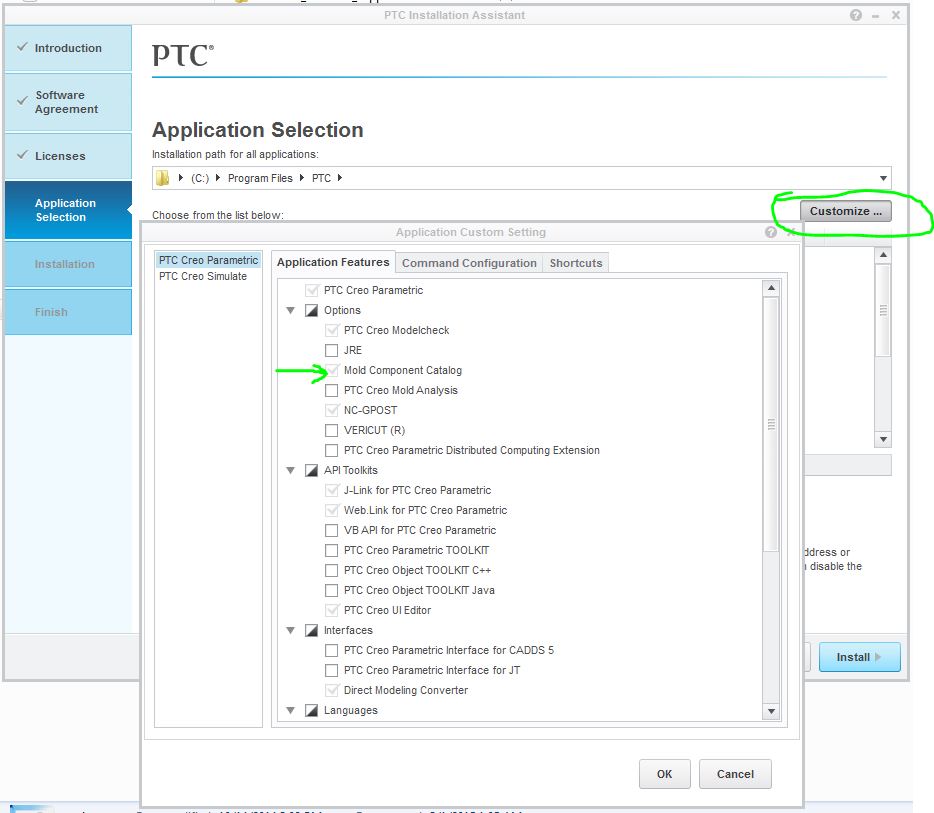
Best answer by Inoram

rerun setup and add the Mold Component Catalog.

mold1.JPG

2 replies

17-Peridot
March 1, 2015

Is it a graphics driver issue where you have fields not showing up correctly?

Posting an image of the step you are stuck at may help.

And if you have maintenance, you can certainly submit a support case.

kbaldau11-VisitorAuthor
1-Visitor
March 1, 2015

Oh yes I meant to post a picture with my original question. Here is the window that I'm having a problem with.

Capture.PNG

17-Peridot
March 1, 2015

Is this the free included mold add-on or the optional mold extension?

I might suggest that the two files do not have the units set to the same thing.

Inoram14-AlexandriteAnswer
14-Alexandrite
March 1, 2015

rerun setup and add the Mold Component Catalog.

mold1.JPG

kbaldau11-VisitorAuthor
1-Visitor
March 1, 2015

Thank you! That fixed the problem.