

1-Visitor
April 10, 2015
Solved

Is it possible to change the crosshairs to white in Creo 3?

  • April 10, 2015
  • 2 replies
  • 2012 views

In draw mode, I like to work with a black background and the crosshairs are currently red. Where or how do I change the color to white?

Thanks for any help you can give me in this regard!


This thread is inactive and closed by the PTC Community Management Team. If you would like to provide a reply and re-open this thread, please notify the moderator and reference the thread. You may also use "Start a topic" button to ask a new question. Please be sure to include what version of the PTC product you are using so another community member knowledgeable about your version may be able to assist.
Best answer by MartinHanak

Bill,

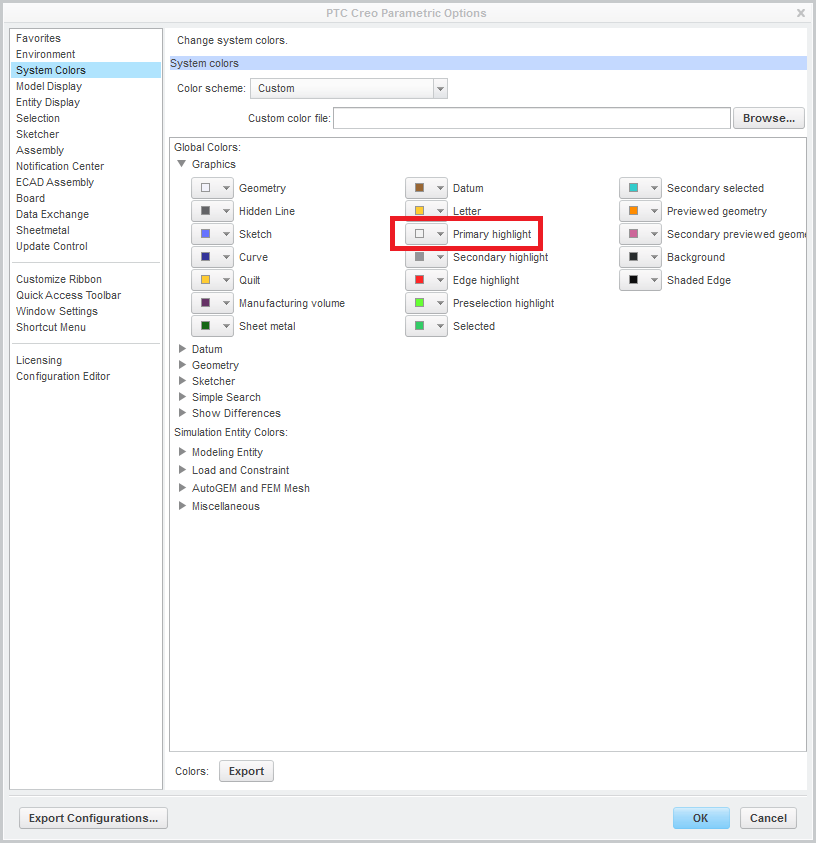
in Drawing mode when you sketch 2D geometry, you can see a crosshair. Its color is driven by Primary highlight system color. You can change it from dark red to white (as shown on the picture). Unfortunatelly this change affects other Creo "areas".

color_setting.png

Martin Hanak

2 replies

24-Ruby III
April 10, 2015

Bill,

in Drawing mode when you sketch 2D geometry, you can see a crosshair. Its color is driven by Primary highlight system color. You can change it from dark red to white (as shown on the picture). Unfortunatelly this change affects other Creo "areas".

color_setting.png

Martin Hanak

bbartloff1-VisitorAuthor
1-Visitor
April 10, 2015

Martin, that's exactly what I wanted. Thanks so much!