

8-Gravel
February 17, 2017
Solved

Is possible to modify name settings of shared parts?

  • February 17, 2017
  • 2 replies
  • 1739 views

Hi,


When i make a multiple shared parts the program automaticaly gives the same name.different number of each part (the number is from .1 to .XX)   :
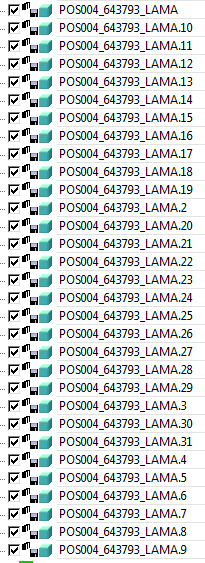
Captura.PNG

When in the structure browser the program put shared parts, the order is not correct because the order put first all the .1X parts second .2X parts etc.This is no logical order.

For me one way to do it right is give another range of names like (the number from .01 to .XX):
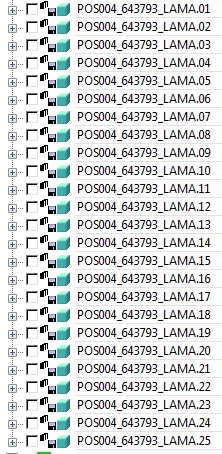
 

Captura_2.PNG

Is possible change some setting to do it autiomatically on Direct/Modeling V.17?
Best answer by mmaenpaa

I'm using V18.1, I would think this setting is available in V17 also,

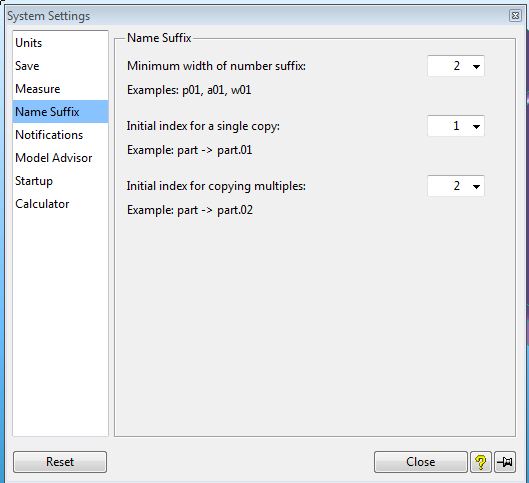
In System Settings, go to Name Suffix >Minimum width of number suffix: and change it to 2.

Hope this helps!

MIke

System_Settings_Name_Suffix.JPG

2 replies

mmaenpaa1-VisitorAnswer
1-Visitor
February 17, 2017

I'm using V18.1, I would think this setting is available in V17 also,

In System Settings, go to Name Suffix >Minimum width of number suffix: and change it to 2.

Hope this helps!

MIke

System_Settings_Name_Suffix.JPG

Ed138-GravelAuthor
8-Gravel
February 20, 2017

Hello,

Yes, is available in V17.

Thank you.