

1-Visitor
April 12, 2019
Solved

Is there a way to purge part faces of color?

  • April 12, 2019
  • 3 replies
  • 2181 views

Greetings,

Creo 5 user here. As you may have experienced, when you import a STEP file, sometimes the original designer exported it such that the material or colors caused the exported file to contain colors on the surfaces of the part.


Is there a quick shortcut to make the entire part or assembly go to Creo's default gray without going through the material editor and editing the colors?


I'm importing more and more black-colored parts and it's difficult to discern geometry.
Best answer by TomU

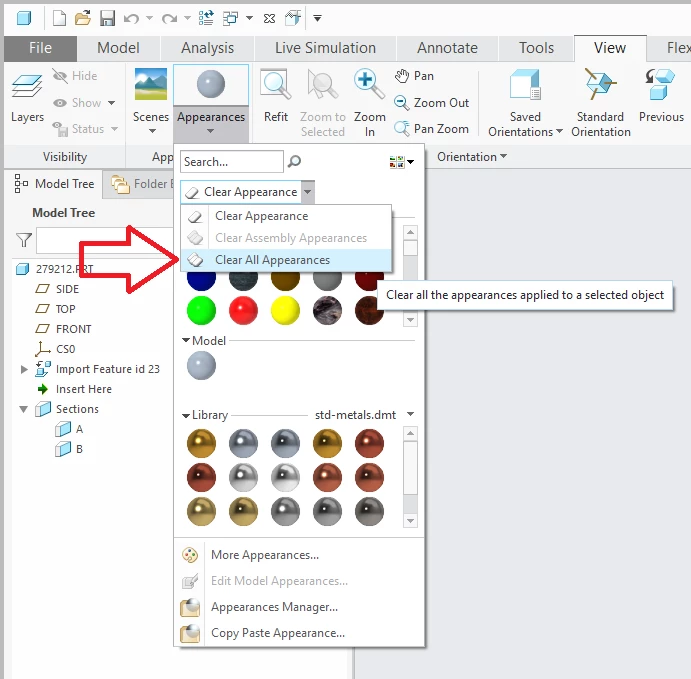
View --> Appearances --> Clear All Appearances


Clear Appearances.png

3 replies

TomU23-Emerald IVAnswer
23-Emerald IV
April 12, 2019

View --> Appearances --> Clear All Appearances


Clear Appearances.png

michaeljh1-VisitorAuthor
1-Visitor
April 12, 2019

You are a gentleman and a scholar. Much appreciated.

21-Topaz I
April 13, 2019

It's indeed a good interactive solution. you might even want to create a mapkey.


Did you try importing the model with a template? This template would have no appearance. Hence when importing the step file the template none appearance would be applied to the model.