

14-Alexandrite
January 9, 2018
Solved

link a parameter between parts

  • January 9, 2018
  • 8 replies
  • 6612 views

I hava a parameter in one part, that defines it's height. I would like to link this parameter to other parts, for when i change the parameter in the first part, every part updates with the new height.

How can i make this?
Best answer by BHOoi

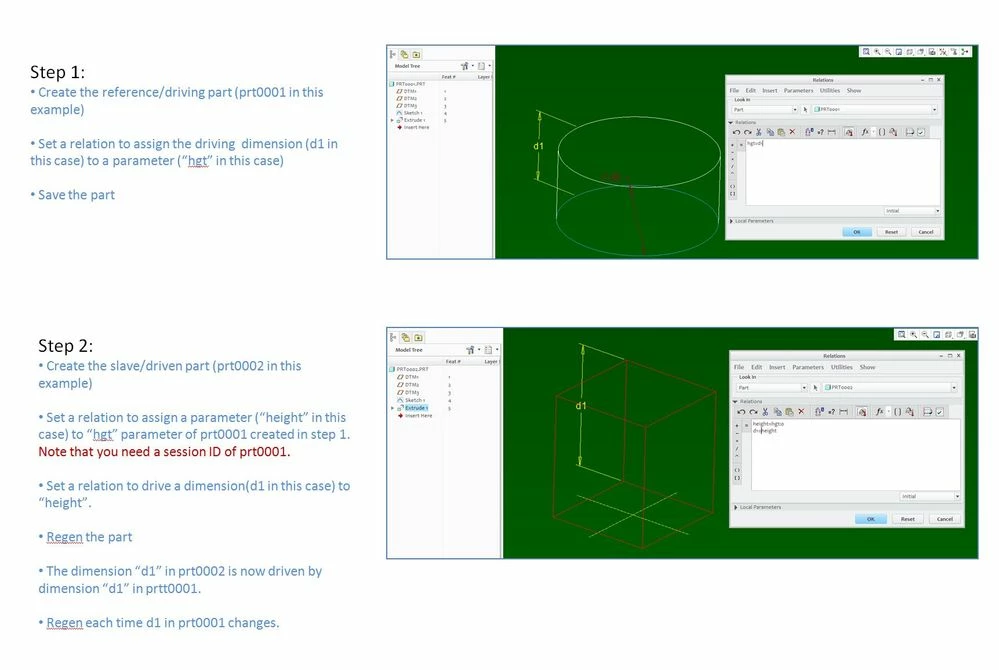
In case you have not got the answer. Here are the steps to extract a parameter value from a reference part:

Capture.JPGI also attached the PPT and example files here for your reference. Hope it helps.

8 replies

1-Visitor
January 9, 2018

The best controlled method uses a feature that used to be called a 'layout' that has been re-branded as 'notebook' The file format is identified with a .lay suffix.


A Notebook can contain simple sketch elements as well as parameters that can be 'declared' in any number of models.


See http://support.ptc.com/help/creo/creo_pma/usascii/#page/assembly%2Fasm%2Fasm_three_sub%2FAbout_Declaring_Notebooks.html%23 for hints about using them for your requirement.


An alternative would be to create relations that use the session ID of the component to flag the correct model to retrieve a value from. However, if some change is made as to which model should drive other models then all other models would need to be altered. Also, this requires the source model to be in session to correctly update the referencing models. A Notebook has a much smaller memory footprint.

CAD_user14-AlexandriteAuthor
14-Alexandrite
January 10, 2018

Hello, thanks by your reply. Definitely with notbook it's possible.


Can you show me an example of  create relations that use the session ID of the component to flag the correct model to retrieve a value from? Sometimes I don't have a notebook, and I need to share a parameter between parts, and I still  didn' found of how to do it.


Thanks

BHOoi16-PearlAnswer
16-Pearl
January 18, 2018

In case you have not got the answer. Here are the steps to extract a parameter value from a reference part:

Capture.JPGI also attached the PPT and example files here for your reference. Hope it helps.