

1-Visitor
May 31, 2017
Solved

Locating Assembly Parts

  • May 31, 2017
  • 7 replies
  • 7733 views

Hi all,

The company i work for uses mapped drives for all of our CAD files (no PDM suite).  To be honest, it's a mess.  I need to know if there is a "smart" way to locate a part, aside from going into microsoft explorer and searching.  For example, If I open a drawing, open the top assembly and then open the part... Is there any information in the part that would tell me where it's being pulled from?

I backed up assembly drawings from our Released CAD folder to my local drive for an ECR and now I'm ready to upload. Only problem is that I am having trouble locating exactly where the affected parts that were in the drawing that I backed up are located.

Thanks!
Best answer by svillafuerte

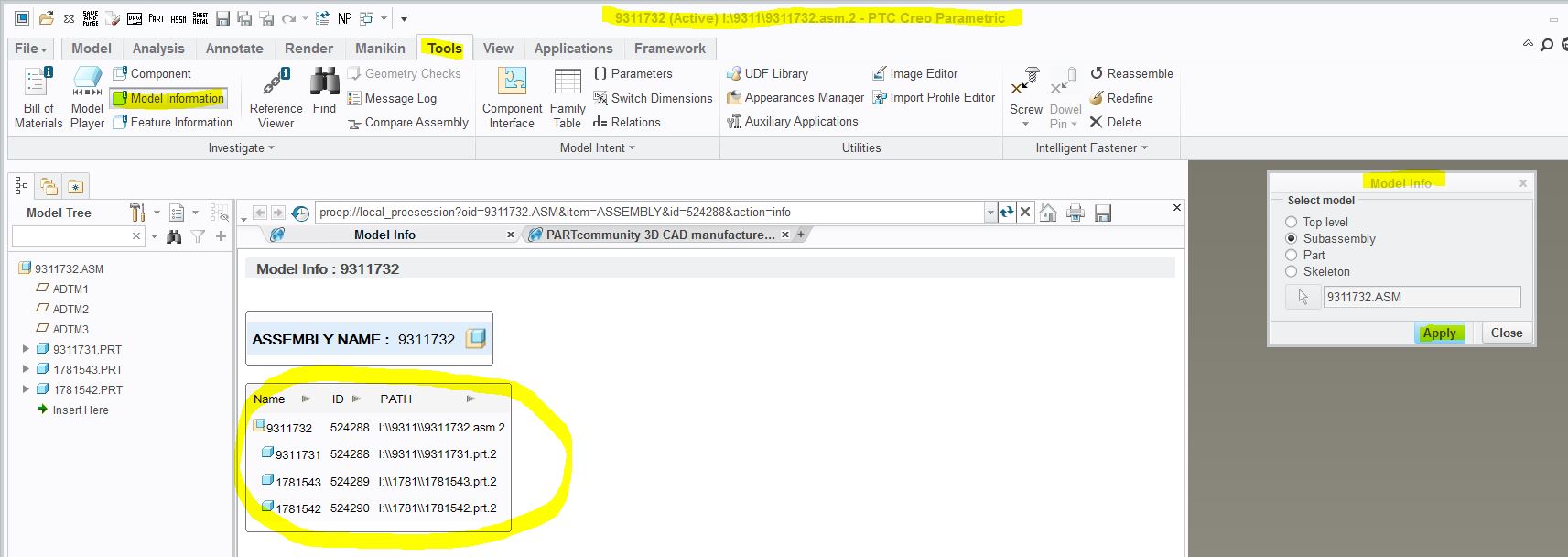
Add this to your config.pro file and it will display full path in your Creo title bar as well as in the information window when you use model information box (all highlighted picks in screenshot below).  And this will work in bot part and assembly files:

display_full_object_path YES

Part Location Picks.JPG

Hope this helps,

Shane V.

7 replies

1-Visitor
May 31, 2017

Add this to your config.pro file and it will display full path in your Creo title bar as well as in the information window when you use model information box (all highlighted picks in screenshot below).  And this will work in bot part and assembly files:

display_full_object_path YES

Part Location Picks.JPG

Hope this helps,

Shane V.

erine1-VisitorAuthor
1-Visitor
June 1, 2017

Hi Shane,

Thank you so much!  I was able to locate all of the affected parts in a large assembly which was pulled from a directory of hundreds of folders and sub-folders.  Certainly not impossible, but this helps a lot!... The snip with highlights is perfect.

1-Visitor
June 2, 2017

We have been using a "Windows Explorer" file system as data management for 20+ years with about 80,000 files, the largest percentage being PTC files, and a mix of Autodesk, SolidWorks, Microsoft, Adobe, etc. making up the rest. This is all with about 20 drafters/designers/engineeers getting in and out of the files for doing their daily work. I personally have finally talked upper management into Windchill/PDMlink after 16 years of asking so we are going through that right now and can't wait to run with that. The file system takes a lot of regimented thought and dedication on who/when/where/why/how someone is touching and changing files. And it comes down to write access and who and when things get "checked" back in to a protected location. If you need more info we could set up something off line sometime but just know that it is very possible to run the way you are going. Good luck.

StephenW
23-Emerald III
May 31, 2017

There is no "hard-coding" of the file locations with part or assembly files. Creo can use search paths in the config file to find files on your drives.

If your company already has this setup, are there other users you can ask within the company to see how they manage changes. Hopefully someone has a good handle on the process because, as you say, "it's a mess" and can quickly escalate to a catastrophe if files are duplicated in multiple locations.

erine1-VisitorAuthor
1-Visitor
June 1, 2017

There's only one other CAD user who is not an engineer.  He used to be a machinist and has no formal computer aided design education or training.  He said that he normally just works directly from the Released CAD files, which seems like a really bad idea to me.  He wouldn't have the problem of locating dependent and affected part files, but if he makes an unintended change and the ECR is released (no checking process in place) that could potentially be a disaster if the unintended changes are manufactured to and make it to the customer.

So no, I'm basically flying solo here as far as the art of drafting is concerned.  I only had a couple of year of experience when I got here, so I think I know just enough to.. know better?  I've been leaning on these boards for help

StephenW
23-Emerald III
June 1, 2017

I agree with the "know better" concept. I've worked in an environment where we did that and it can quickly get out of control.

Glad you found a solution. I think your concept of pulling the files out to a "working directory" and then "checking them back in" is a good work method but time consuming from the file management standpoint.

I used PDMLink now so I'm not much help, but there are many many other users who use file folder storage methods, maybe they can give you some tips and techniques to improve your process.