

1-Visitor
February 20, 2015
Solved

Making Lines in Tables Invisible (Creo 2.0)

  • February 20, 2015
  • 4 replies
  • 12437 views

I am creating a BOM table in Creo with repeat regions that also lists which parts are not shown in the drawing. I would like to make the vertical line inside the red box invisible. (Please reference the attached drawing "example_table.PNG.") Is there a way to make lines in a table invisible in Creo? Thanks for any help.


This thread is inactive and closed by the PTC Community Management Team. If you would like to provide a reply and re-open this thread, please notify the moderator and reference the thread. You may also use "Start a topic" button to ask a new question. Please be sure to include what version of the PTC product you are using so another community member knowledgeable about your version may be able to assist.
Best answer by sgupta-2

1) Go to Table Tab

2) Select the table in which you want to make line invisible

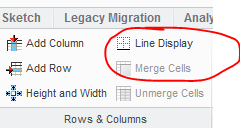
3) After selection of table under rows & columns option Line Display option will be highlighted

4) then select the line you want to make invisible.

Untitled.png

4 replies

sgupta-21-VisitorAnswer
1-Visitor
February 21, 2015

1) Go to Table Tab

2) Select the table in which you want to make line invisible

3) After selection of table under rows & columns option Line Display option will be highlighted

4) then select the line you want to make invisible.

Untitled.png

24-Ruby III
February 22, 2015

Hello,

it is important to know that Creo enables you to "hide" inner table lines, only !

Dirty trick...

If you want to have table consisting of 1 cell "without" borders, then create such table, enter requested text/parameter into it and change the size of the cell to 0.1x0.1mm. The cell borders transform to almost invisible dot .

Martin Hanak