

12-Amethyst
March 7, 2016
Solved

Mapkey to open parts with cursor in search bar

  • March 7, 2016
  • 5 replies
  • 5195 views

Hello,

I would like to record a mapkey which allows me to show the file open window and click with mouse pointer in the search bar ("enter characters to dinamically filter displayed content") in the upper right corner of the windows, so that I can type directly the file I want to open:
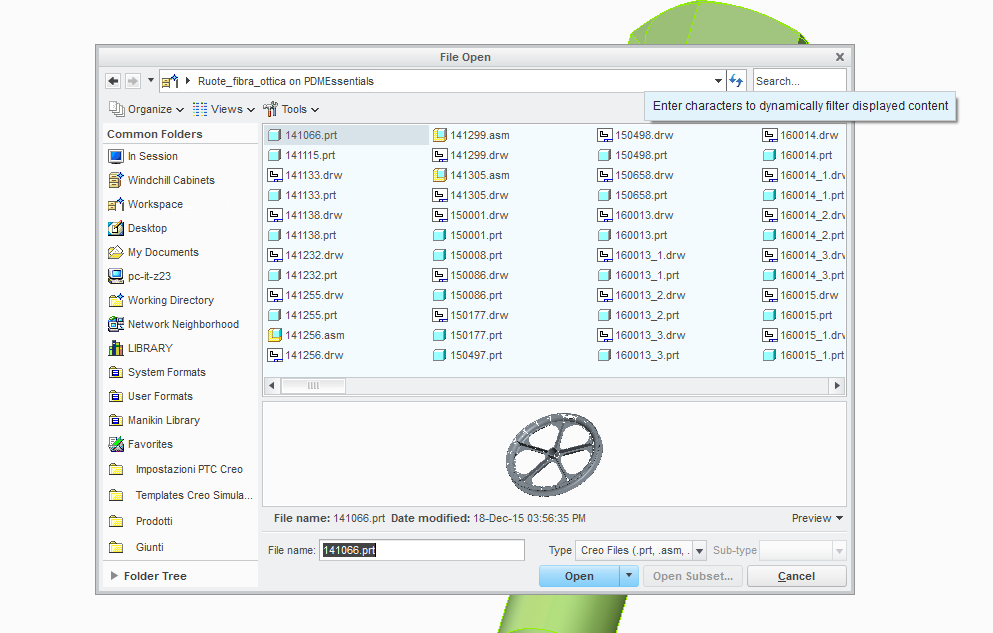
1.png

I tried to record it, but it only opens the windows (and If I type, keystrokes appear in the File name bar below.

(an alternative to this is to type the filename in the bar below ("File name:") but the unconvienent in this is that you have to remember the exact filename to spot the part (while this is not the case, many times).

anyone has a suggestion in order to fix this? ( maybe to add some string text in the mapkeys file?) or have a workaround...

thanks

bye bye


This thread is inactive and closed by the PTC Community Management Team. If you would like to provide a reply and re-open this thread, please notify the moderator and reference the thread. You may also use "Start a topic" button to ask a new question. Please be sure to include what version of the PTC product you are using so another community member knowledgeable about your version may be able to assist.
Best answer by jcivetta

this works perfectly find for me.

I guess the ' are not the right (with the copy and paste).

try from my attachment

5 replies

1-Visitor
March 8, 2016

Hello

here what i use to go the dynamic search

mapkey fom @MAPKEY_LABELFile Open Model;~ Command `ProCmdModelOpen`; \

mapkey(continued) ~ Update `file_open` `EMBED_BROWSER_SEARCH_IP` ``;

tleati12-AmethystAuthor
12-Amethyst
March 11, 2016

Hello John,

thanks for your suggestion.

I tried your mapkey but when I press the key this message appears:

4.png

and then if I type something in that bar ("test") and press ok, the file open windows appears with the word typed in the file name bar below:

5.png

while instead I am searching for a way to have the cursor directly in the upper right search bar:

6.PNG

because in the file name below bar you have to type the entire file name including its extension.

Does your mapkey behave this way in your Creo too?

thanks

bye

Tommaso

12-Amethyst
March 8, 2016

try these.  it conditions the search to drawings, parts or assemblies

tleati12-AmethystAuthor
12-Amethyst
March 11, 2016

Hi Ron,

thanks for your suggestion. I tried your maokeys but indeed what I am searching for is not much to filter by file type but instead a way to have the cursor directly in the upper right search bar:

6.PNG

but I find it useful to have also the distinction by file type, If I solve my inquiry I may create a combination of both (curson in the search bar and items already filtered by file type).

thanks

bye

Tommaso

2-Explorer
March 10, 2016

Hello Tommaso,

have you been able to use the suggestions from Jean-Raymond and Ron?

Thanks,

Gunter

tleati12-AmethystAuthor
12-Amethyst
March 14, 2016

Hello,

I have been able to solve the problem by creating a mapkey which recalls an external OS script written in autohotkey. The mapkey is the following (in square brackets the custom texts):

mapkey [mapkey key sequence] @MAPKEY_NAME[mapkey description]; \

mapkey(continued) @MAPKEY_LABEL[mapkey label]; \

mapkey(continued) ~ Command `ProCmdModelOpen`

mapkey(continued) ~ Trail `UI Desktop` `UI Desktop` `DLG_PREVIEW_POST` `file_open`;\

mapkey(continued) @SYSTEM C:\\[path to the script file]\\scriptname.ahk;

this mapkey firstly opens the File Open window, then recalls the script file "scriptname.ahk", which in turn activates the "File Open" window (necessary step since at the moment of the script launch the active window is not the Creo File Open window), and presses 3 times the Tab key.

The autohotkey script contains just the following two lines:

WinActivate File Open

Send {TAB 3}

two little unconvenients of this procedure are:

-the appearance of the black DOS command window for a fraction of second

-the process lasts 0,7 second (so not as fast as expected)

(but works fine anyway).

As an alternative, instead of the ahk script, a VB Script could be put in, with which the black DOS window can be hidden and maybe it's also faster (but I don't know how to make a VB Script ).

(Any alternative suggestion is welcome anyway).

bye

Tommaso

1-Visitor
March 14, 2016

Did you try my answer? because it does exactly what you are asking for.

tleati12-AmethystAuthor
12-Amethyst
March 15, 2016

Hi John,

yes I had tried your mapkey and replied to you on

which in the end has two ' ' that might be read as illegal characters...now I am trying to modify them (or replace with something else) and let you know the output.

thanks

bye

Tommaso

2-Explorer
March 15, 2016

Hello Tomasso,

don´t know exactly your target with this macro, but know some useful utility how to OPEN DRAWING FROM ACTIVE 3D MODEL.

See link following link:

Creo Parametric, načtení výkresu z otevřeného 3D modelu

It´s in czech language, but it´s quiete simply to understand.

Maybe it´s not useful for you, maybe yes ...

Just for your information

Regards Milan

tleati12-AmethystAuthor
12-Amethyst
March 15, 2016

Hi Milan,

yes, thanks a lot, that's another thing I am searchin for as it would be extremely comfortable. I had read about someone who manage to do it and at a first look seemed quite complicated and long to develop, I will take a look to the video and let you know the output!

bye

Tommaso