


21-Topaz I
May 30, 2018
Solved

Mini Toolbar icons; Creo 4 upgrade

  • May 30, 2018
  • 1 reply
  • 1775 views

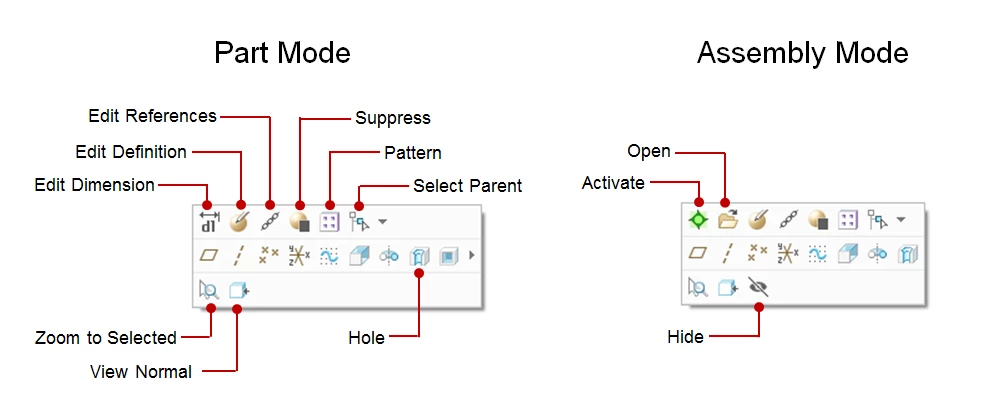
I am working on training for our users when we move to Creo 4. The Creo 4 quick reference card does not have a breakout for the mini toolbar with arrows and words explaining what each icon means. This is probably because the mini toolbar changes with context and user preference.


That being said has anyone else generated a graphic showing the default buttons?
Best answer by Chris3

For anyone that comes across this in the future - PTC has icon definitions for Simulate (link below) but nothing for core modeling (go figure).

http://support.ptc.com/help/creo/creo_pma/usascii/index.html#page/simulate/simulate/getstart/getstart/reference/3d_mini_toolbar_commands.html


I made my own for training purposes:

Capture.PNG

1 reply

Chris321-Topaz IAuthorAnswer
21-Topaz I
June 27, 2018

For anyone that comes across this in the future - PTC has icon definitions for Simulate (link below) but nothing for core modeling (go figure).

http://support.ptc.com/help/creo/creo_pma/usascii/index.html#page/simulate/simulate/getstart/getstart/reference/3d_mini_toolbar_commands.html


I made my own for training purposes:

Capture.PNG