1-Visitor
January 24, 2015
Solved

Model Rendering Problem

  • January 24, 2015
  • 3 replies
  • 2914 views

Hello!

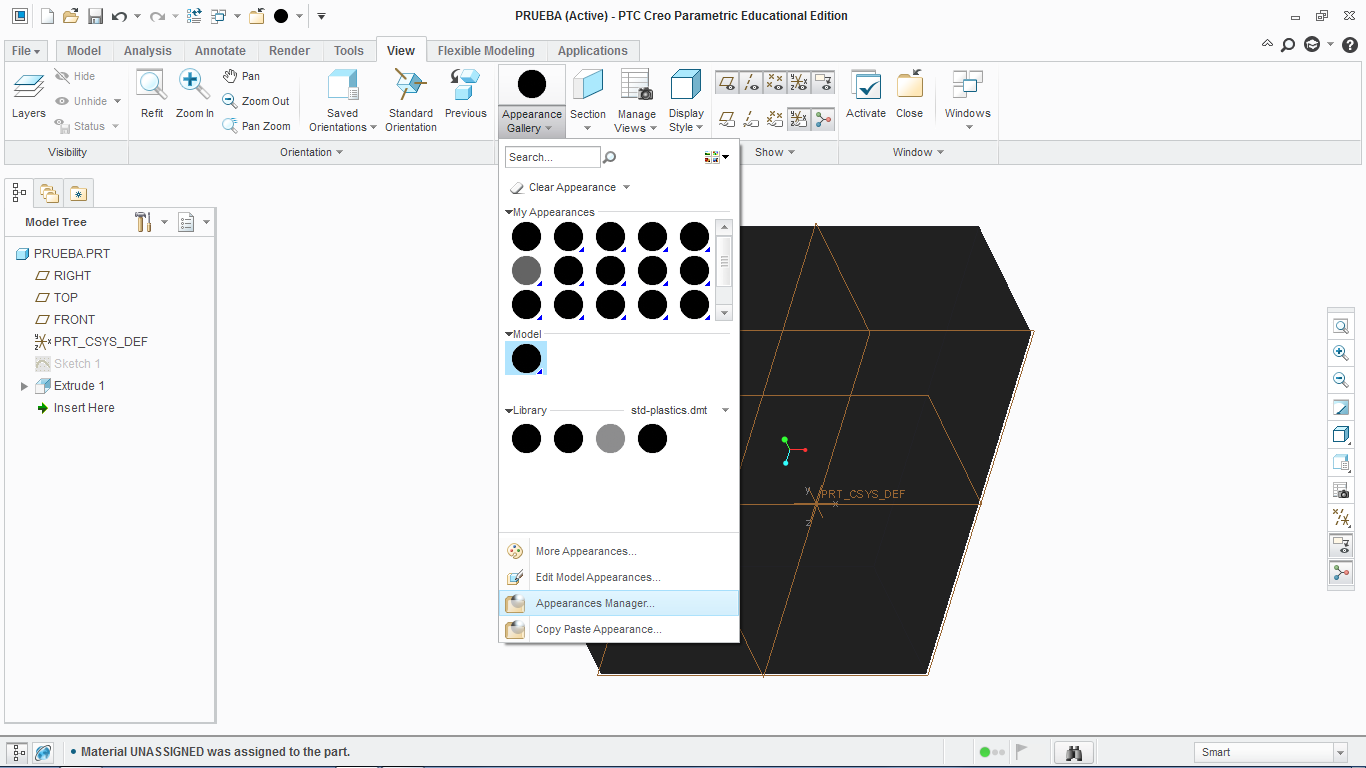
My problem is the following:

ptc_creo_problem.png

As you can see, whenever I create a solid part or an assembly, it looks black. I figured that it might have a relation with the Appearance Gallery, which all appears black as well. I've tried to open the diferent files of the different appearance galleries (default, global, appearance . dmt ), but it didn't work. I also tried to edit each appearance, tweaking the parameters in the dialog box, but it stays black.

Do you know how it can be solved?

Thanks for reading the post and answering it as well if you can. I'm already grateful. (:


This thread is inactive and closed by the PTC Community Management Team. If you would like to provide a reply and re-open this thread, please notify the moderator and reference the thread. You may also use "Start a topic" button to ask a new question. Please be sure to include what version of the PTC product you are using so another community member knowledgeable about your version may be able to assist.
Best answer by Mahesh_Sharma

Seems to be Graphics issue, look at earlier post http://communities.ptc.com/message/267932#267932

3 replies

17-Peridot
January 24, 2015

Welcome to the forum, Juan.

See if you have the Scene set to a PhotoLux setting.

24-Ruby III
January 24, 2015

Juan,

maybe it is graphics problem.

Download my config.pro, unzip it and place into startup directory.

Martin Hanak

1-Visitor
January 26, 2015

Yes it now shows the appearances, but for some reason, the Display Style "Shading with reflections" looks the same as "Shading",

But oh well, at least I can work better now. Thank you!

Mahesh_Sharma
22-Sapphire I
January 25, 2015

Seems to be Graphics issue, look at earlier post http://communities.ptc.com/message/267932#267932

1-Visitor
January 26, 2015

Yes it now shows the appearances, but for some reason, the Display Style "Shading with reflections" looks the same as "Shading",

But oh well, at least I can work better now. Thank you!

Mahesh_Sharma
22-Sapphire I
January 26, 2015

As it is working with that option, issue is due to graphics card/drivers. Possibly it will fix after updating the drivers. You may mark the relevnt post as correct answer, which might be helpful for others.