1-Visitor
March 5, 2015
Solved

Modelcheck paramter setting ?

  • March 5, 2015
  • 3 replies
  • 3473 views

Hi

Is there any option inside model check setting to skip the parameter value to be entered when interactive is running.

In one of the parameter we set "string " as an data type and entered the numerical numbers , but now I want to change same parameter

data type from string to Integer .So , it is asking once again to enter the value when mc is running.

Like that , I have to change 12 parameters in all the models .Don't want to enter the value every time & instead keep the same value & change data type .

How to achieve this ???


This thread is inactive and closed by the PTC Community Management Team. If you would like to provide a reply and re-open this thread, please notify the moderator and reference the thread. You may also use "Start a topic" button to ask a new question. Please be sure to include what version of the PTC product you are using so another community member knowledgeable about your version may be able to assist.
Best answer by Mahesh_Sharma

Haris,

You can use ModelCHECK to change data type from String to Integer, however it will not maintain the existing values. Parameter will update only after defineing the value for parameter.

1. Set PARAMCHECK as E in check file.

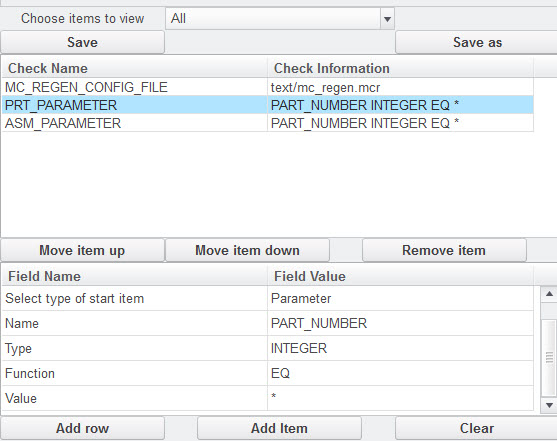
2. Add Mode_PARAMETER PARAMETER INTEGER EQ * in start file (e.g. PRT_PARAMETER PART_NUMBER INTEGER EQ *)

MC1.jpg

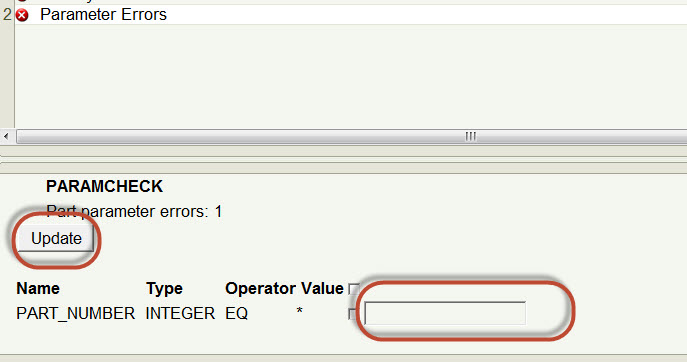
3. Execute ModelCHECK, ModelCHECK will report Parameter Errors

4. Enter the value (You cannot skip this) in that and update parameter

mc2.jpg

3 replies

23-Emerald II
March 12, 2015

Haris,

I have moved this thread to the Creo community as this is not related to Windchill.

Mahesh_Sharma
22-Sapphire I
March 13, 2015

Haris,

You can use ModelCHECK to change data type from String to Integer, however it will not maintain the existing values. Parameter will update only after defineing the value for parameter.

1. Set PARAMCHECK as E in check file.

2. Add Mode_PARAMETER PARAMETER INTEGER EQ * in start file (e.g. PRT_PARAMETER PART_NUMBER INTEGER EQ *)

MC1.jpg

3. Execute ModelCHECK, ModelCHECK will report Parameter Errors

4. Enter the value (You cannot skip this) in that and update parameter

mc2.jpg

Mahesh_Sharma
22-Sapphire I
March 26, 2015

Haris,

Are you able to accomplish your ModelCHECK task?