


Solved
Move Dimension Value
Creo 3, M070
OK, I'm pretty sure I've done this in Creo 3, but I can't seem to do it now. The Creo 3 drawing "enhancements" are killing me. I've got this:
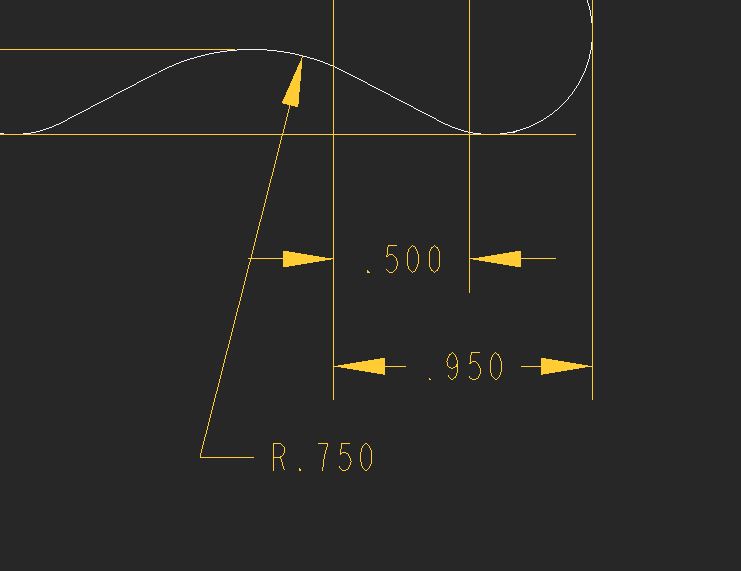
I need to move the R.750 to the left side of the leader, like this:
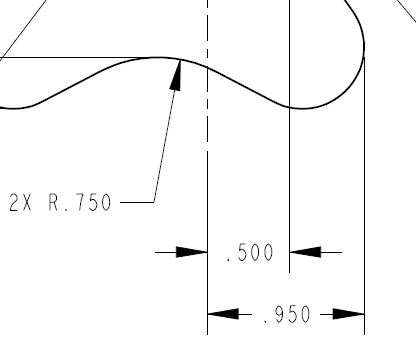
That's from a PDF made from an older version of the same drawing. Unfortunately, I had to recreate the dim and I can't get the text to move. I can drag the dim around just fine and I can hover over the text and get a double arrow that implies that I can drag the text, but it simply moves the entire dim. I've tried a shown and created dim with the same results.
How do I move the text in Creo 3?
This thread is inactive and closed by the PTC Community Management Team. If you would like to provide a reply and re-open this thread, please notify the moderator and reference the thread. You may also use "Start a topic" button to ask a new question. Please be sure to include what version of the PTC product you are using so another community member knowledgeable about your version may be able to assist.
