

1-Visitor
September 15, 2015
Solved

Need help with Creo 2.0

  • September 15, 2015
  • 4 replies
  • 3002 views

Hello everybody,


I am trying to do my hw, but I got stuck at the small circle in the red areas. So, Can you guys please show me how to make 5 circles that their angles of distances from each other are the same?


I don't remember what my professor did, but he said about 360/5????


I can do the other ways, but it will take a lot of time.
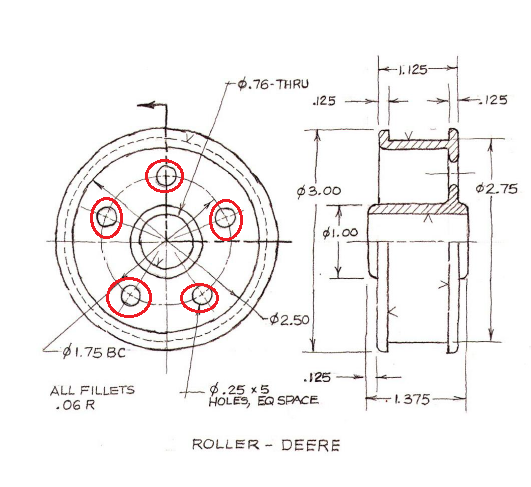
4.png


Thank you all


This thread is inactive and closed by the PTC Community Management Team. If you would like to provide a reply and re-open this thread, please notify the moderator and reference the thread. You may also use "Start a topic" button to ask a new question. Please be sure to include what version of the PTC product you are using so another community member knowledgeable about your version may be able to assist.
Best answer by BenLoosli

You build a rotational pattern and for the angle you enter 360/5. You could then modify the 5 to the d# that has the value of 5. That will keep the angle parametric.

4 replies

BenLoosli23-Emerald IIIAnswer
23-Emerald III
September 16, 2015

You build a rotational pattern and for the angle you enter 360/5. You could then modify the 5 to the d# that has the value of 5. That will keep the angle parametric.

1-Visitor
September 16, 2015

Put in one hole and then pattern it. If you want to follow the design intent of the sketch, then place the first hole as a type "Diameter". Then pattern the hole using an axis pattern that references the center axis of the part. 5 pattern members, equally spaced around 360 degrees. Screenshot is from Creo 3, but it's the same in Creo 2.

pattern.jpg

dcoin1-VisitorAuthor
1-Visitor
September 18, 2015

I don't really like to make another post, so I post it here D

Can anybody please show me where I can find the dome mode????

I look for everywhere, but I can't find it.

l43.png

Thank you

StephenW
23-Emerald III
September 18, 2015

In the top right corner, there is a magnifying glass for search. Click the glass then type dome in the box, it will take you to the dome command.

I personally would simply add a revolved arc on your part though.

I would also suggest in your future posts to start new ones with titles that are more descriptive of your question. Most everyone asking questions needs help with Creo X.0 so a better title would probably help you get better responses and allow you to mark correct answers on the post so future users can search and find answers easier.

dcoin1-VisitorAuthor
1-Visitor
October 27, 2015

I am practicing for a midterm, after I am done with everything, I don't really know how to make the bracket look like in picture. Please help me!!! 

20151027_131842_zpskbuth0ke.jpg

Thank you

dcoin1-VisitorAuthor
1-Visitor
October 28, 2015

Oh i get it, so I only need to cut it with a retangular.

Thank you so much, I totally didn't think about it