

Solved
Network route not displayed
After I create a network and complete the feature the network disappears. It is still there but not displayed. Is there some way to have it always be displayed?

After I create a network and complete the feature the network disappears. It is still there but not displayed. Is there some way to have it always be displayed?
Hi Chris,
The network will display when you turn off the "Cable" icon. Use the "Wire" icon. If you want the wires to show, you would use the "Cable" icon. See below...
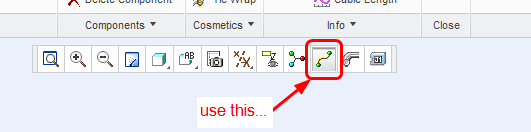
Best regards,
Lori
No account yet? Create an account
Enter your E-mail address. We'll send you an e-mail with instructions to reset your password.