

23-Emerald III
January 11, 2017
Solved

New drawing format and template

  • January 11, 2017
  • 1 reply
  • 2204 views

I have renamed our existing part drawing template and format and have added a BOM table, so I am using a single template for parts and assemblies. The engineer only needs to delete the BOM if it is a part file and a material table if it is an assembly.

However, when I create a new drawing and use the new template, the BOM does not populate automatically. If I add the BOM table to the drawing, it will populate 'manually'. What could be causing this to function to not work automatically from the drawing template?

Creo 2 m220

Windchill 10.0 m040
Best answer by TomU

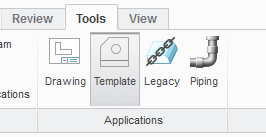
Was the template in "template mode" when the repeat region was added to it?

(Might be located somewhere else in Creo 2.)

1 reply

TomU23-Emerald IVAnswer
23-Emerald IV
January 11, 2017

Was the template in "template mode" when the repeat region was added to it?

(Might be located somewhere else in Creo 2.)

BenLoosli23-Emerald IIIAuthor
23-Emerald III
January 11, 2017

The repeat region BOM table and other tables are added at the format level then the format is added to the drawing template.

I will try to replace the format with the drawing set to template mode and see what happens.

BenLoosli23-Emerald IIIAuthor
23-Emerald III
January 11, 2017

Adding the format to the drawing while in template mode did the trick.

Thanks, Tom.