

1-Visitor
September 19, 2016
Solved

Note Properties in Creo 3 not the same as Creo?

  • September 19, 2016
  • 2 replies
  • 3485 views

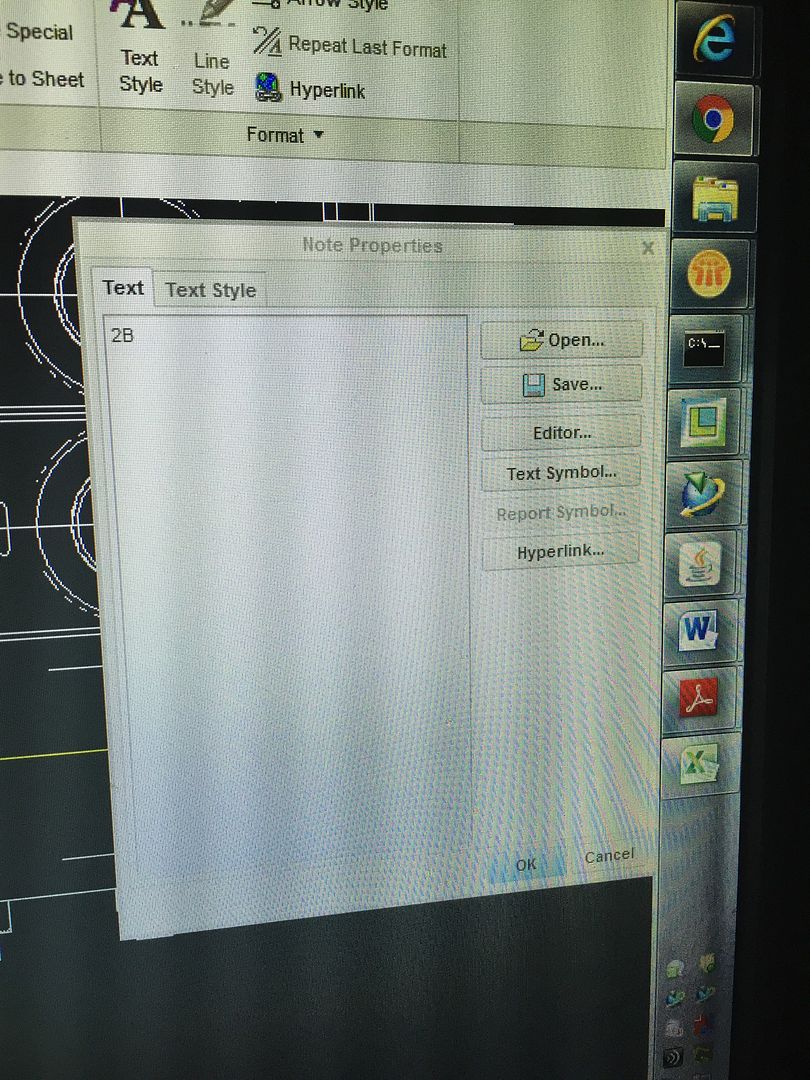
We use Creo at work however at school we have creo 3.  One of the most annoying issues I have is when I make a note, in Creo 3 I type right in paper space.  However in Creo a Note Properties box comes up where I can type my text in there.  Is there a way to get the Note Properties box to come up in Creo 3?

Text box below in creo.
IMG_80701_zpsofoju3il.jpg

    Best answer by TomU

    This properties box was removed when Creo 3.0 was first released.  Due to customer complaints, it was added back into the Creo 3.0 M100 maintenance release.  If you are running M100 (or later), you can right click on the note and click "properties" to open this dialog.

    2 replies

    TomU23-Emerald IVAnswer
    23-Emerald IV
    September 19, 2016

    This properties box was removed when Creo 3.0 was first released.  Due to customer complaints, it was added back into the Creo 3.0 M100 maintenance release.  If you are running M100 (or later), you can right click on the note and click "properties" to open this dialog.

    dholloman1-VisitorAuthor
    1-Visitor
    September 19, 2016

    Tom,  How do you go about getting the maintenance release?

    23-Emerald III
    September 19, 2016

    If it is the academic version on a school server, the administrator will need to request the new build from PTC.

    dholloman1-VisitorAuthor
    1-Visitor
    September 19, 2016

    I have downloadable edition that is used for school.  Sorry for the confusion.