

13-Aquamarine
December 11, 2018
Solved

Opening Solidworks Assembly with missing parts

  • December 11, 2018
  • 2 replies
  • 8711 views

I have a Solidworks assembly from a customer.  It looks like they forgot to include some library parts, screws and such.  The important parts I need to see are all present.  The assembly opens and then gives an error that files are missing, but the suppress/delete options I would normally see are greyed out (see image below).  I would like to open the assembly and just skip the missing parts.  If I were opening native Creo files I would be able to suppress the missing parts and still open the assembly.  Is there a config setting to accomplish this, or how can I open the assembly without these missing parts?
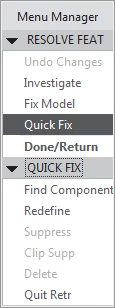
menu.png

Best answer by BillChapman

The issue was with a config setting, you cannot have regen_failure_handling resolve_mode set or things seem to stop without recourse.


After commenting this out the assembly opens fine.

2 replies

KenFarley
21-Topaz II
December 11, 2018

What version of Creo are you using? The behavior of the program has changed over the years when it's presented with assemblies with missing bits.

I don't know what it does for Solidworks assemblies, but if I load an assembly in but neglect to set my search path properly, the assembly will come up but all the bits it can't find are listed in the model tree in red. It doesn't stop me from opening the assembly. It seems like it loads the stuff in with some sort of "last positioned" component placements. I don't know if it will do this with a Solidworks assembly, though.

I'm on Creo 4.0, by the way.

BillChapman13-AquamarineAuthorAnswer
13-Aquamarine
December 11, 2018

The issue was with a config setting, you cannot have regen_failure_handling resolve_mode set or things seem to stop without recourse.


After commenting this out the assembly opens fine.