

1-Visitor
April 9, 2018
Solved

OpeningText Symbol Pallet while inserting a text note in Creo 3.0

  • April 9, 2018
  • 1 reply
  • 3878 views

Sometimes I want a diameter symbol or a plus/minus symbol when I am creating a note but I can only edit the note afterwards to add the special characters.  Is there a way (ie: ctrl S) to call up the text symbol pallet while inserting a note in Creo 3.0?
Best answer by StephenW

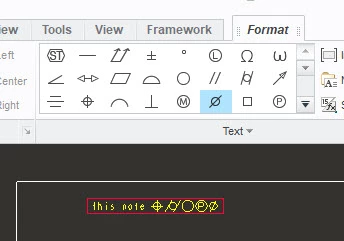
When creating a note, they have the special characters palette in the ribbon when you are first creating a note.

palette.jpg

1 reply

StephenW23-Emerald IIIAnswer
23-Emerald III
April 9, 2018

When creating a note, they have the special characters palette in the ribbon when you are first creating a note.

palette.jpg

1-Visitor
April 9, 2018

StephenWilliams is exactly right, and normally I will click from that menu. But when I don't feel like taking my hands away from the keyboard for a mouse-click, I also use alt-codes for the character I want, most often "±". To use these codes, hold down the alt key while typing the number on the keypad for the symbol you want, then release the alt key. ± is "alt 241", while ø is "alt 0248". Putting "alt symbols windows" into a search engine will offer several pages with relevant lists.