

3-Newcomer
November 5, 2014
Solved

Parameter Drop Down

  • November 5, 2014
  • 3 replies
  • 4536 views

Howdy. The question has been asked before, but the solution offered isn't quite what I'm looking for and thought you all might have some constructive input.

I want the ability to have a drop-down list of variables for a given parameter. For example, the parameter is MATERIAL and I'd like the drop down list in the model tree to contain ALUMINUM, STEEL, ABS, etc. The answer that is out there is use the Restricted Parameter List, which works almost exactly how I want except it is a RESTRICTED list.

In other words, I want the convenience of having a drop down list but I want my users to be able to use a value that's not in the list. Also, I don't want to have to modify my restricted parameter file every time someone wants to use a new material.

Does that even make sense? Any ideas on how to do this?

Many thanks,

-Chris
    Best answer by ngoutis

    Chris,

    If your primary reason for needing this revolves around material assignments, here are a few thoughts that may help solve your problem.

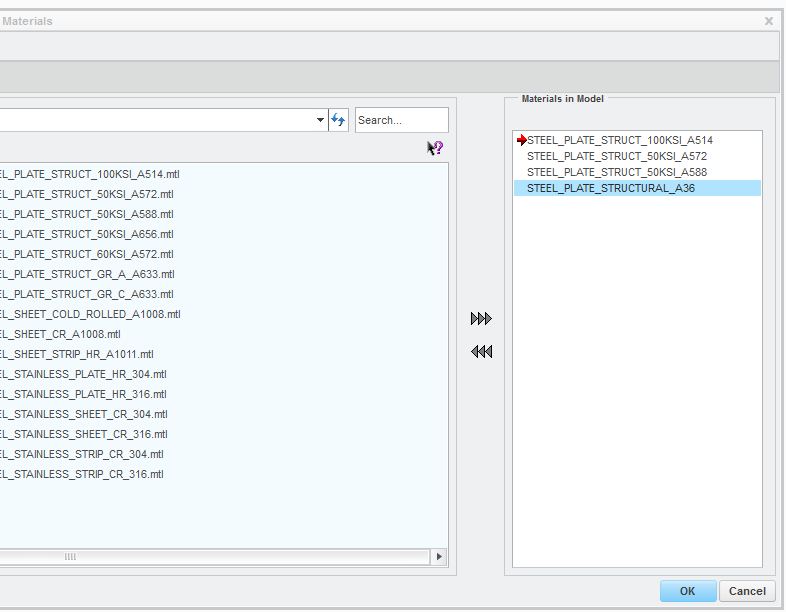
    Are you familiar with the system parameter "PTC_MATERIAL_NAME"? The first time a material file is added to a model, Creo automatically adds this parameter to your list of model parameters. As more material files are added to your model, this parameter automatically becomes a drop-down list which options consist of whatever materials are in your model. Capture2.JPGCapture3.JPG

    What our organization has done is developed a large library of material files which users can select from. They are also free to create new materials as needed.

    Alternatively, material files can be added to a Start Part model, so that referencing a library might not be needed most of the time.

    Hope this is somewhat helpful.

    3 replies

    12-Amethyst
    November 5, 2014

    Yes, that makes sense, but I think it´s not possible without programming.

    The way I see to do this is create a small program in JLink that reads and shows the value of the parameter, then, if you press the dropdown menu, it reads from a external file (a .csv for example) other editable options for the value.

    Jose

    cbierman3-NewcomerAuthor
    3-Newcomer
    November 6, 2014

    Thanks for the reply, Jose. I'm not sure I have that in me though. I'll just file this one in the wishful-thinking basket for the moment.

    2-Explorer
    November 10, 2014

    Just idea, that could help you.

    Search ProE Help for: "Table-restricted Value Parameter"

    Table-Restricted.jpg

    Generall way that l´m using thise function:

    IF material == steel

    than

    material_german ==stahl

    endif

    Hope it can help you...

    ngoutis10-MarbleAnswer
    10-Marble
    November 21, 2014

    Chris,

    If your primary reason for needing this revolves around material assignments, here are a few thoughts that may help solve your problem.

    Are you familiar with the system parameter "PTC_MATERIAL_NAME"? The first time a material file is added to a model, Creo automatically adds this parameter to your list of model parameters. As more material files are added to your model, this parameter automatically becomes a drop-down list which options consist of whatever materials are in your model. Capture2.JPGCapture3.JPG

    What our organization has done is developed a large library of material files which users can select from. They are also free to create new materials as needed.

    Alternatively, material files can be added to a Start Part model, so that referencing a library might not be needed most of the time.

    Hope this is somewhat helpful.

    cbierman3-NewcomerAuthor
    3-Newcomer
    November 21, 2014

    Thanks, Nick. This is a good piece of information. I'm going to explore this option further and I appreciate your help.
