

12-Amethyst
October 12, 2016
Solved

Parts disappear while spinning assembly

  • October 12, 2016
  • 5 replies
  • 4890 views

I have one computer that while rotating any assembly, parts will either disappear or show as like a white checker box. Its a new computer build using the same hardware as many others in the department, so I can't think of anything hardware that might be the issue... it very well might be though.

The pictures below are the same model. Left one is while spinning the assembly and the right is when you release it after spinning. Everything comes back immediately and just can't figure out what is going on. It gets very annoying when trying to check out fitment and the part just disappears...
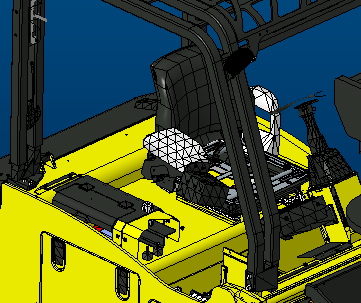
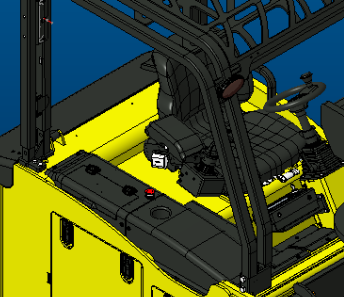
Anyone have any ideas of what I could try?


This thread is inactive and closed by the PTC Community Management Team. If you would like to provide a reply and re-open this thread, please notify the moderator and reference the thread. You may also use "Start a topic" button to ask a new question. Please be sure to include what version of the PTC product you are using so another community member knowledgeable about your version may be able to assist.
Best answer by StephenW

That kind of looks like the level of detail option in the config which only comes in to play when spinning the model. Is the new system running the same configuration files as the other systems?

The config.pro options are:

LODS_enabled  YES/NO

LODS _value 

It's also in the options dialog box under model display, look under the shaded model display settings for level of detail

5 replies

12-Amethyst
October 12, 2016

Forgot to mention... Has occurred with the last 3 releases of Creo 3.0 we've used M060, M090, and M100.

StephenW
StephenW23-Emerald IIIAnswer
23-Emerald III
October 12, 2016

That kind of looks like the level of detail option in the config which only comes in to play when spinning the model. Is the new system running the same configuration files as the other systems?

The config.pro options are:

LODS_enabled  YES/NO

LODS _value 

It's also in the options dialog box under model display, look under the shaded model display settings for level of detail

12-Amethyst
October 12, 2016

I disabled that and now everything stays while rotating. Its set in our company config.pro, so I am surprised that only one person has this issue. I will just edit it out on their personal config and go from there...

Is this a setting for performance issues? You set it to a lower percentage if you have a lower performance machine???

Thanks for the help!!!

StephenW
23-Emerald III
October 12, 2016

I've always assumed it was to allow for quicker spinning. I have never liked it. Maybe I've always had more than adequate computers but spinning 3d models have never been a major problem...now large assembly drawings...that needs a lot of help.

Don't forget to mark a correct answer so others searching for resolution to similar problems may find a solution quicker.

Have a good day.