

1-Visitor
September 1, 2016
Solved

preferred_save_as_type

  • September 1, 2016
  • 6 replies
  • 6081 views

Hi everybody,


maybe a simple question, but I can't figure it out. I've included the following settings in my config.pro:


preferred_save_as_type PDF

preferred_save_as_type STEP

preferred_save_as_type DXF


When i open Creo these settings appear in the loaded configuration settings under File > Options > Configuration Settings. However when I create a new part and select File > Save As > Save a Copy the type list is still in default configuration. Am i doing something wrong or...?


I am running Creo Parametric 3.0 M030


Thanks in advance,


Dave
Best answer by TomU

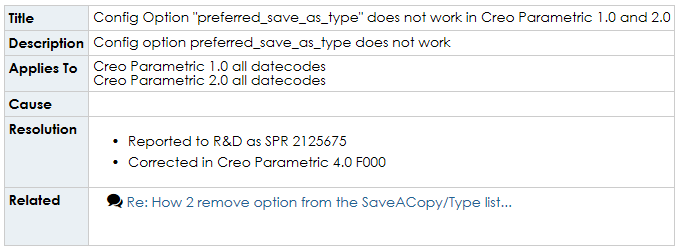
It looks like PTC broke it between Wildfire 5 and Creo 1 and is finally fixing it in Creo 4.

https://support.ptc.com/appserver/cs/view/solution.jsp?n=CS61360

6 replies

TomU23-Emerald IVAnswer
23-Emerald IV
September 1, 2016

It looks like PTC broke it between Wildfire 5 and Creo 1 and is finally fixing it in Creo 4.

https://support.ptc.com/appserver/cs/view/solution.jsp?n=CS61360

dbreen1-VisitorAuthor
1-Visitor
September 1, 2016

Then it makes sense that i do not get it working!

Thanks for your reply!

Dave

1-Visitor
October 23, 2018

I didn't find any other threads except for this one.  I'm using Creo 4.0 M050 and trying to figure out this preferred_save_as_type option.


What do I put as the options?  I've tried STL, .STL, *.STL, Stereolithography (*.stl).  None seem to change the default list of types in the drop-down menu or the default.  If I wanted to order it like STL then PRT, what should I enter?  And does it work for Creo 4.0 M050 in the first place?