

16-Pearl
December 7, 2015
Solved

Printing with Creo 3.0 M070

  • December 7, 2015
  • 1 reply
  • 2431 views

Hi all,

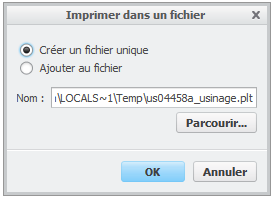
Since I installed Creo 3.0 M070, every time I want to print a drawing, I have a new window appearing like the one below, asking me to print to a file. Once I clicked Ok, I retrieve the normal process for printing. Anyone could tell how to skip this step which is useless for me.

By the way, what is the interest in printing to a file ?

This thread is inactive and closed by the PTC Community Management Team. If you would like to provide a reply and re-open this thread, please notify the moderator and reference the thread. You may also use "Start a topic" button to ask a new question. Please be sure to include what version of the PTC product you are using so another community member knowledgeable about your version may be able to assist.
Best answer by MartinHanak

Hi,

Tom Uminn is right. Default list of printer configurations (files with .pcf extension) has been modified and the resulting state is confusing.

I can see two problems:

No.1: Three instances of MS_PRINT_MGR printer configuration

No.2: No option is selected in Destination section of Configuration d'imprimante dialog box on your pictures

You have to check .pcf files accessible by Creo 3.0 from three locations:

No.1: Creo3_Common_Files\text\plot_config directory

No.2: directory set using plot_config_dir option in config.pro file

No.3: startup or working directory

FYI http://help.ptc.com/creo_hc/creo30_pma_hc/usascii/index.html#page/pma/fundamentals/fund_two_sub/Plotter_Configuration_Fi… contains description of printer configuration files.

MH

1 reply

24-Ruby III
December 7, 2015

Hi,

it looks like your Creo is configured to print to file ...

  • what is the value of plotter option in config.pro ?
  • what printer configuration is selected, if you click File > Print > Print > Settings ?

MH

RaphMORIN16-PearlAuthor
16-Pearl
December 7, 2015

In my config.pro, plotter is set to ms_print_mgr

By default, ms_print_mgr is selected

The strange thing is that nothing changed in my configuration between M060 & M070.

I noticed something strange, when I click on the icon to select the printer. I have 3 times MS_PRINT_MANAGER

23-Emerald IV
December 7, 2015

Check your working (startup) directory and see if you have extra .pcf files there.  The displayed printer name ("MS_PRINT_MGR") is based off something inside the file, not the name of the file.