15-Moonstone
October 25, 2017
Solved

Pro/User of the Carolinas - Meeting November 12, 2015

  • October 25, 2017
  • 15 replies
  • 5070 views

Registration is now open for the 2017 Fall Pro/Users of the Carolinas event on November 9, 2017 at Lenovo in Morrisville, NC.  If you live in the area we would love to see you at the event.

Upcoming Events | 2017 Fall Event at Lenovo | Pro/Users of the Carolinas


Best answer by dgschaefer

I assume that you need to create a curve along the silhouette of that shape as viewed from the mold opening direction, right?


You can use the surface trim tool to create that.


  1. Create a surface copy of the outside of the part
  2. Select the resulting quilt
  3. Select the trim tool
  4. Select the plane that represents the parting line direction (perpendicular to the mold open direction)
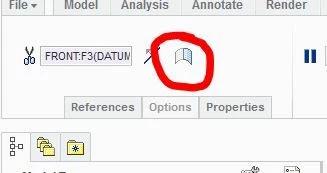
  5. Select the "silhouette trium" icon on the trim dashboard:Capture.JPG


You can then use the flip to keep either side or both sides of the surface. 


The resulting edge should be the P/L curve you want.

15 replies

21-Topaz II
October 25, 2017

I assume that you need to create a curve along the silhouette of that shape as viewed from the mold opening direction, right?


You can use the surface trim tool to create that.


  1. Create a surface copy of the outside of the part
  2. Select the resulting quilt
  3. Select the trim tool
  4. Select the plane that represents the parting line direction (perpendicular to the mold open direction)
  5. Select the "silhouette trium" icon on the trim dashboard:Capture.JPG


You can then use the flip to keep either side or both sides of the surface. 


The resulting edge should be the P/L curve you want.

15-Moonstone
October 26, 2017

The problem is that it's not a plane but a curve. I'm aware that I can split the quilt with an extruded surface made from a curve or even better create the curve directly with the intersect command.


The main problem is that I can't create the split curve manually. It must be at the highest point of the swept surface which is a double curved surface. See attached pic which shows curve projected on surface. This curve is pretty close but not the exact split line.

1-Visitor
October 26, 2017

The plane sets only the direction the mold halves will move. It should create a 3D edge curve along the divided copy of the surface. You don't create the curve - Creo does. You don't project anything. Creo uses the mold-split direction based on the plane you pick to find the edge you are looking for.