

1-Visitor
January 23, 2015
Solved

Problem with AAX and ISDX

  • January 23, 2015
  • 8 replies
  • 3138 views

I recently had a hard drive failure. When I got my computer back from IT, I was no longer able to use AAX (Advanced Assembly Extension) and ISDX (Interactive Surface Design Extension).

My IT person insists that he installed the same license file.

Is there a separate license file for these modules? Would he have had to install these modules separately? Is there a way to tell which modules are installed / licensed? I've gone to File >> Help >> System Information, but I don't see anything that looks like AAX or ISDX.

I am using Creo 2.0.


This thread is inactive and closed by the PTC Community Management Team. If you would like to provide a reply and re-open this thread, please notify the moderator and reference the thread. You may also use "Start a topic" button to ask a new question. Please be sure to include what version of the PTC product you are using so another community member knowledgeable about your version may be able to assist.
Best answer by Mahesh_Sharma

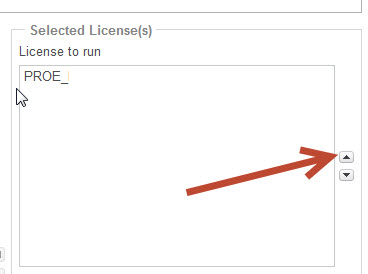
Ok, you need to move PROE_FlexAdvISD on top priority. Select PROE_FlexAdvISD license in list and use up arrow to move that upside.

Config.jpg

8 replies

Mahesh_Sharma
22-Sapphire I
January 23, 2015

Possible these licenses were not not added in command to start. You may need to reconfigure Creo 2.0

1. Run reconfigure.exe from <Creo 2.0 install location>\Parametric\bin

2. Select Next > Next > Customize

3. Select Command configuration > Edit

4. Move required Licenses from left to right > Ok > Ok > Install.

Hope this will help.

1-Visitor
January 23, 2015

Thank you for your help.

When I ran the utility, these were the licenses listed to run:

1.png

There were no additional licenses on the left-hand side.

John

Mahesh_Sharma
22-Sapphire I
January 23, 2015

Ok, you need to move PROE_FlexAdvISD on top priority. Select PROE_FlexAdvISD license in list and use up arrow to move that upside.

Config.jpg

1-Visitor
January 23, 2015

Now that I have done this, my Flexible Modeling has disappeared. Does one prevent the other from running?

Mahesh_Sharma
22-Sapphire I
January 23, 2015

I think, reason of this is, License for Flexible modeling is a part of PROE_EssentialI and AAX & ISDX are in PROE_FlexAdvISD, so when Creo will launch for sirst time, it will use PROE_FlexAdvISD. In that session you will get AAX and ISDX, if you will launch new session, it will use PROE_EssentialI which will allow flexible modeling.

1-Visitor
January 26, 2015

Thank you. This worked.