


Process to edit fonts
We currently use FONT on our drawings and we have an issue with the 1, I(i) and lowercase L being visually in indistinguishable. So we are looking to use ISOFONT instead, however this has an issue with the spacing of some letters.
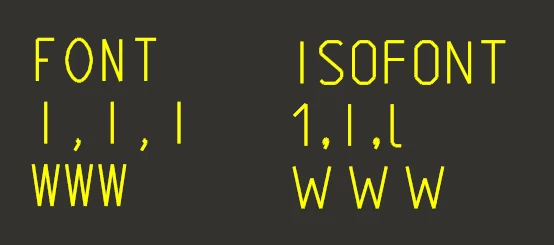
So I would like to edit the ISOFONT to reduce the spacing between certain characters, I have gotten as far as:
1. Create new directory, add decompile_font.exe, compile_font.exe, isofont.fnt, ucore46.dll & udata46.dll
2. decompile the ISOFONT.fnt using:
decompile_font.exe isofont.fnt newisofont.fnt
3. edit the decompiled NEWISOFONT.fnt
4. recompile NEWISOFONT.fnt TO ISOFONT.fnt using:
compile_font.exe newisofont.fnt isofont.fnt
5. Move isofont.fnt into Common Files\x86e_win64\text\usascii
However when I re-launch Creo and try to change some text to the edited ISOFONT I get this error:
Font isofont.ndx.ndx can not be loaded
I presume this is a compiling error as I haven't touched the ndx file, if I understand correctly the ndx file just gathers various fnt files? Can someone shed some light on it please, I haven't been able to find any documentation on how to edit fonts, Im just making it up as I go along.
Many thanks