

1-Visitor
April 4, 2017
Solved

Question on Density and Mass display on Creo

  • April 4, 2017
  • 3 replies
  • 6812 views

Hello, I have a basic question on displaying mass and density in Creo.  Can change the default unit of mass to Kg when we measure it.  Please see attached file for the details. Even when I change the mass / Density units to Kg / Kg/mm3, but when we measure it on the part level, we still get them in Tonnn / mm3.  Does Creo allow this to be modified to the unit that we want, like Kg/mm3 or gm/cm3 etc..


I am sure there is may be some answer out there for this question, but I could not get access to it.  Creo version is 4.0
Best answer by StephenW

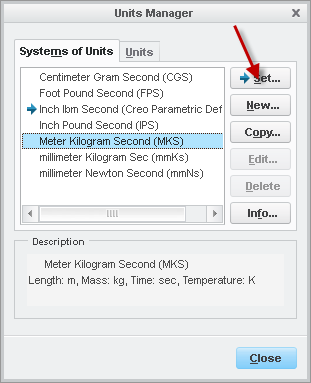
Are you actually changing the units in the part? If I change the units in the part, it also changes the units in the mass properties dialogs.

Are you pushing "SET" kn the units manager when you change the units?

3 replies

StephenW23-Emerald IIIAnswer
23-Emerald III
April 4, 2017

Are you actually changing the units in the part? If I change the units in the part, it also changes the units in the mass properties dialogs.

Are you pushing "SET" kn the units manager when you change the units?

fd-21-VisitorAuthor
1-Visitor
April 4, 2017

Stephen, Thanks for reply, It solved my question.  When I set this to MKS, I am getting the mass in Kg.

21-Topaz I
April 6, 2017

Since Stephen answered your question can you mark it as the correct answer?

23-Emerald IV
April 4, 2017

One other thing to point out.  The units will display based on the active model.  If a part is active, the units will reflect how that part is set.  If the assembly is active then everything will display based on that assembly's setting (regardless of how the parts are set.)

5-Regular Member
April 6, 2017

Good day Firoz,

I am glad you were able to find a solution with PTC Community!

As Steve Galayda‌ requested, would you please make Stephen Williams‌ answer as correct?

Doing so makes the information easier for others to find.

Thank you,

Toby