

1-Visitor
October 2, 2015
Solved

Quickly changing sheet format

  • October 2, 2015
  • 4 replies
  • 3224 views

When you need to change sheet size on a drawing, it would be nice if instead of the blank "A1 size", "A2 size"... formats being listed in the drop down, you could have your custom ones listed instead. See the picture below.


It seems that this should be possible, but I'm not sure how - can anyone explain how to do this? I'm using Creo 2, M0120
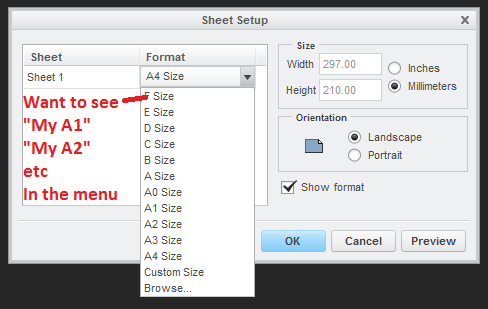
Format list.png


Thanks,

Dave


This thread is inactive and closed by the PTC Community Management Team. If you would like to provide a reply and re-open this thread, please notify the moderator and reference the thread. You may also use "Start a topic" button to ask a new question. Please be sure to include what version of the PTC product you are using so another community member knowledgeable about your version may be able to assist.
Best answer by mender

Best you can do now is two more clicks (Browse... to get to the file selection dialog with pro_format_dir, OK having picked it).  Pulldown lists aren't especially well-suited to potentially-very-long-lists (say, your pro_format_dir has hundreds of formats in it), thus the design as it is (custom format will be listed if currently in use in the drawing, but otherwise, you go to Browse...).

4 replies

mender12-AmethystAnswer
12-Amethyst
October 2, 2015

Best you can do now is two more clicks (Browse... to get to the file selection dialog with pro_format_dir, OK having picked it).  Pulldown lists aren't especially well-suited to potentially-very-long-lists (say, your pro_format_dir has hundreds of formats in it), thus the design as it is (custom format will be listed if currently in use in the drawing, but otherwise, you go to Browse...).

dcox-21-VisitorAuthor
1-Visitor
October 2, 2015

I thought that might be the case, I was hoping it would be possible to define a few that are used most often to go in the list, like with plot configs. It's not costing much time - you don't often need to change the format, but I think it would be a nice to have feature. Product idea maybe.

10-Marble
October 5, 2015

This is not actually what you were asking for, just another workaround, but it works fine, and my users love it.

Consider mapkeys a1 to a4

We make use of this in combination with a template.drw

The standard template is A4 (portrait), (config options 'template_drawing' and 'pro_format_dir' should be set)

The mapkeys for A1-A3 do the same, but in addition to mapkey a4 they switch to the desired size after loading the template and confirm the remove of existing tables, if neccessary.

By doing so we cover A4 portrait and A1-A3 landscape which is all we need.