


Solved
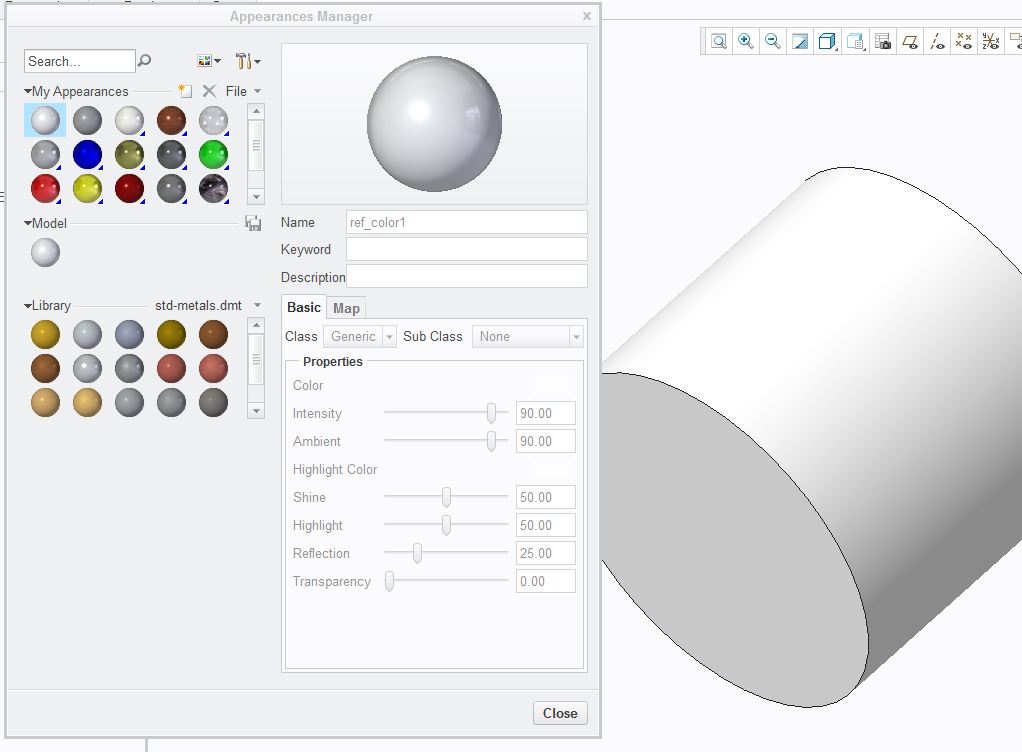
ref_color1 has changed to bright white
I am using Creo 3.0 M010. My default part color recently changed from some shade of gray to bright white. I cannot figure out how to change it back. I think it occurred when restarting after I changed the edge resolution while working with cylindrical parts. It's pretty bad since we use a white background (to copy images to presentations) and the parts are now barely visible. I've tried changing the RGB or the intensity or ambient properties but they cannot be changed.
The parts starts out with the default ref_color1 which is now white (90% intensity) but I now see another called <ref_color1> that is the gray (white with 60% intensity) I used to have. Why did the system change the default?
Any clues? Thanks.
This thread is inactive and closed by the PTC Community Management Team. If you would like to provide a reply and re-open this thread, please notify the moderator and reference the thread. You may also use "Start a topic" button to ask a new question. Please be sure to include what version of the PTC product you are using so another community member knowledgeable about your version may be able to assist.