

1-Visitor
January 13, 2016
Solved

Ref Dimension? CREO 2.0

  • January 13, 2016
  • 2 replies
  • 10002 views

If I want to show a dimension as reference... do I have to add the parenthesis... or is there a better way?


This thread is inactive and closed by the PTC Community Management Team. If you would like to provide a reply and re-open this thread, please notify the moderator and reference the thread. You may also use "Start a topic" button to ask a new question. Please be sure to include what version of the PTC product you are using so another community member knowledgeable about your version may be able to assist.
Best answer by JamesAvis

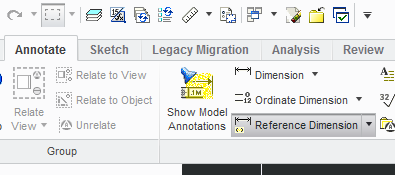
You could use the Reference Dimension tool under the Annotate tab.

1-13-2016 1-03-18 PM.png

2 replies

12-Amethyst
January 13, 2016

Gotta add 'em

JamesAvis14-AlexandriteAnswer
14-Alexandrite
January 13, 2016

You could use the Reference Dimension tool under the Annotate tab.

1-13-2016 1-03-18 PM.png

doneill-21-VisitorAuthor
1-Visitor
January 13, 2016

Oh jeez... right in front of my nose!

Thanks!!!

12-Amethyst
January 14, 2016

In my defense, and clarification, you did say "show a dimension" as reference, not an "added" dimension. (I know - nit pickin)

The difference being obvious, model driven vs draft and it shows up in the drawing tree annotations as:

refdim.png

just sayin....

It would affect places like where I work that scans with modelcheck for added dimensions.

ron