

1-Visitor
February 10, 2017
Solved

Rename parts with a parameter

  • February 10, 2017
  • 4 replies
  • 3825 views

Hello.

Is there a way to rename parts/assemblies/drawings using a parameter? Or is there a way to rename automatically several files writing the name only one time? The problem is that I have to rename the drawing, assembly and a part with the same name a lot of times, so it would be good if there is a way to reduce the time inverted on it.

Thanks in advance
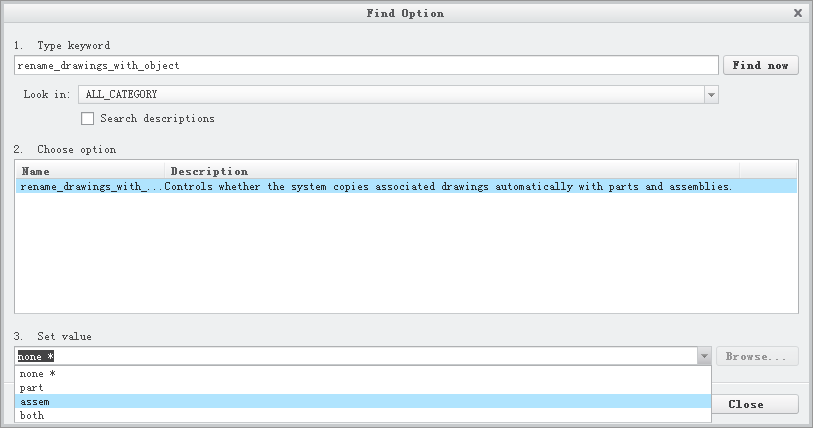
Best answer by cchen-2

QQ图片20170216110545.png

may be able to help

4 replies

Chris3
21-Topaz I
February 10, 2017

You can't use a parameter to do this. The best you can do is to use a mapkey or one of the APIs if you can program.

1-Visitor
February 10, 2017

you can also click save as copy, where you can rename them all at once. it also supports search and replace and wildcards (*) so if you have a properly defined name in the beginning, you can convert it to whatever you want.

24-Ruby III
February 11, 2017

Hi,

renaming is dangerous operation, because all related objects must be opened in Creo session, renamed and saved.

Solution no.1: Rename files using Windchill functionality, if you have Windchill implemented

Solution no.2: Create custom application, which executes renaming action for you according your company rules.

MH

cchen-27-BedrockAnswer
7-Bedrock
February 16, 2017

QQ图片20170216110545.png

may be able to help

imoldes1-VisitorAuthor
1-Visitor
February 17, 2017

Hello.

Thank you all for your answers.

A Wei, this could help me a lot, didn't know that option. Thank you very much!