
15-Moonstone
September 12, 2018
Solved

Reorder in assembly

  • September 12, 2018
  • 2 replies
  • 3814 views

Hi,


In assembly we are going to reorder or drag any part / sub-assembly to UP then if we keep curser on assembly for some time (few sec) then it goes inside sub-assembly.


So i want to know can we limit it to only first level or increase holding time.


e.g.

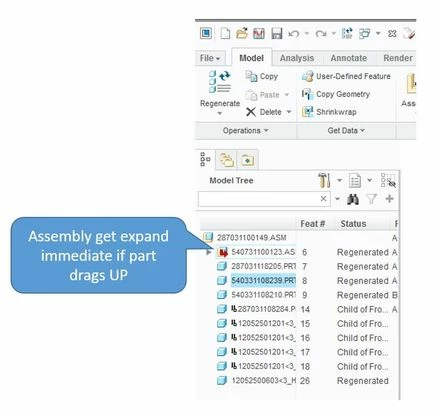
In below snap, we want to reorder / restructure of highlighted component but if we drag part to UP then once curser goes to assembly it expand asm and drop in that.

So instead of this we want to reorder part easily like “reorder Feature, which is available in part mode”. OR any alternate way to keep it only one level. 
 

Capture.JPG

Regards,

Prashant

This topic has been closed for replies.
Best answer by StephenW

In this Product idea, Creo 4 M040 added an option to stop restructuring.

https://community.ptc.com/t5/Creo-Parametric-Ideas/Stop-Model-Tree-Reorder-Becoming-a-Restructure/idi-p/467294


Please check out Creo 4.0 M040 for "enable_dragdrop_on_components".


We've now added a new config option to prevent restructuring in the Model Tree. It's called "enable_dragdrop_on_components" and allows to choose between "all"(default) and "reorder".

  • "All" allows both operations, Restructure and Reorder.
  • "Reorder" allows you to only reorder components and features via drag&drop in the Model Tree; Restructure is then prohibited.

Restructuring via the ribbon/menu commands is still then possible.

2 replies

StephenW
StephenW23-Emerald IIIAnswer
23-Emerald III
September 12, 2018

In this Product idea, Creo 4 M040 added an option to stop restructuring.

https://community.ptc.com/t5/Creo-Parametric-Ideas/Stop-Model-Tree-Reorder-Becoming-a-Restructure/idi-p/467294


Please check out Creo 4.0 M040 for "enable_dragdrop_on_components".


We've now added a new config option to prevent restructuring in the Model Tree. It's called "enable_dragdrop_on_components" and allows to choose between "all"(default) and "reorder".

  • "All" allows both operations, Restructure and Reorder.
  • "Reorder" allows you to only reorder components and features via drag&drop in the Model Tree; Restructure is then prohibited.

Restructuring via the ribbon/menu commands is still then possible.

15-Moonstone
September 18, 2018

Thanks. The option is working in Creo 4.0.


Currently, we are using Creo3.0 M120 and option not found in this version. So we have to wait till we upgrade Creo across organisation.

Thanks for your response.


Regards,

Prashant Pandarkar