

1-Visitor
May 17, 2018
Solved

Rotate assembly/view view with respect to current view.

  • May 17, 2018
  • 2 replies
  • 11044 views

How can i rotate model with respect to the current viewing position.

lets say i am looking at the Front view, is there a way to rotate the view 90 deg to get the top view without having to select the Top view the view orientations.


Note : I am used to this kind of thing in SW and it was very helpful in viewing all possible angles using just arrow keys and Shift+arrow keys. i just want to know is it possible to do in Creo.


Thanks in advance for your answers.
Best answer by StephenW

Great.

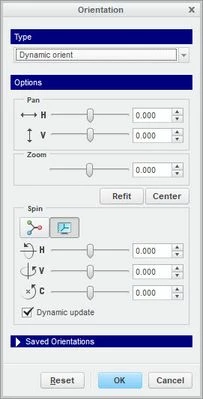
For the 90° orientation, make a mapkey using dynamic orient. Go to the view tab, saved orientations, reorient, then you'll get a pop up orientation box, change the "type" to dynamic orient. Then you and key in orientation angles based on the axis you want to spin around. 


orient.jpg

2 replies

1-Visitor
May 17, 2018

You can dynamically orient a view and chose horizontal with a value of 90 degrees.


If this happens often you can capture a mapkey to make this move. Or create a mapkey that selects Top.

vdevan1-VisitorAuthor
1-Visitor
May 17, 2018

i am not an expert in creo, and I find it hard to understand ..

can you share any tutorial relating to this .. 

23-Emerald III
May 17, 2018

You can't use the arrow keys like that in Creo.

You can create mapkeys to do what you want.


The link is a youtube video on how to create mapkeys.

There are also a lot of posts on creating mapkeys in the forum, many of which deal with view orientation.


https://www.youtube.com/watch?v=FWp_ASys8ZE

vdevan1-VisitorAuthor
1-Visitor
May 19, 2018

hey Stephen, 

Thank you so much for the response.

I tried doing map keys, and could successfully create map keys.

i faced 2 problems,

1. It do not accept combination with Shift / Ctrl 

2. I still cannot figure out a way to rotate my current view,  90 deg Right or 90 deg left.


am not worried about the first one , i need answer for second.

Thanks in advance.


StephenW23-Emerald IIIAnswer
23-Emerald III
May 19, 2018

Great.

For the 90° orientation, make a mapkey using dynamic orient. Go to the view tab, saved orientations, reorient, then you'll get a pop up orientation box, change the "type" to dynamic orient. Then you and key in orientation angles based on the axis you want to spin around. 


orient.jpg