1-Visitor
September 12, 2016
Solved

Search for a cad part when assembling

  • September 12, 2016
  • 2 replies
  • 4423 views

Creo has a search tab. You may search for a Number , but the result table does not display the Number. When searching for several parts with the same Name, but different Numbers, all are the same. How to find the right one ? How to add a column for the Number ?

The help (?) shows how to display details, but there is no detail pane. Where is the detail result table ?


This thread is inactive and closed by the PTC Community Management Team. If you would like to provide a reply and re-open this thread, please notify the moderator and reference the thread. You may also use "Start a topic" button to ask a new question. Please be sure to include what version of the PTC product you are using so another community member knowledgeable about your version may be able to assist.
Best answer by Jose_Costa

Try this:

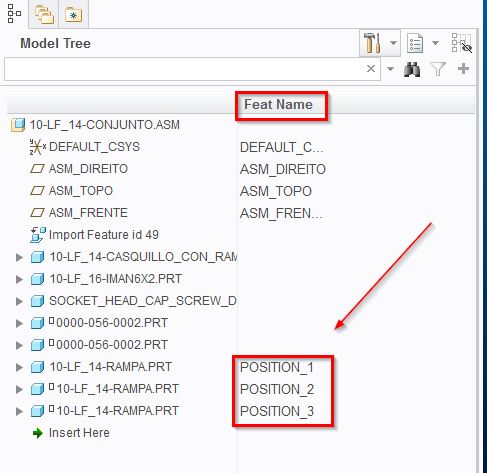
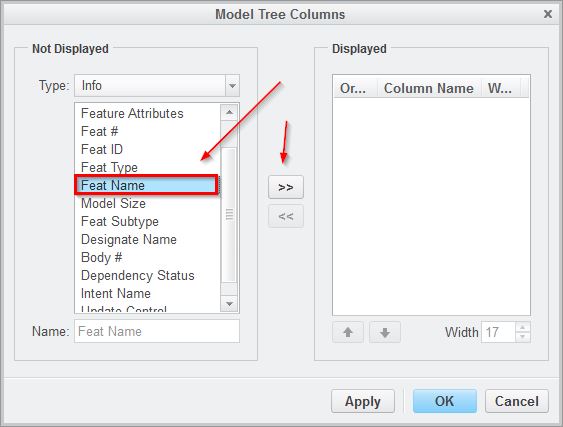
1 - Add column "Feat Name" to your modeltree;

1.jpg

2 - Add unique names to each of part placements;

2.jpg

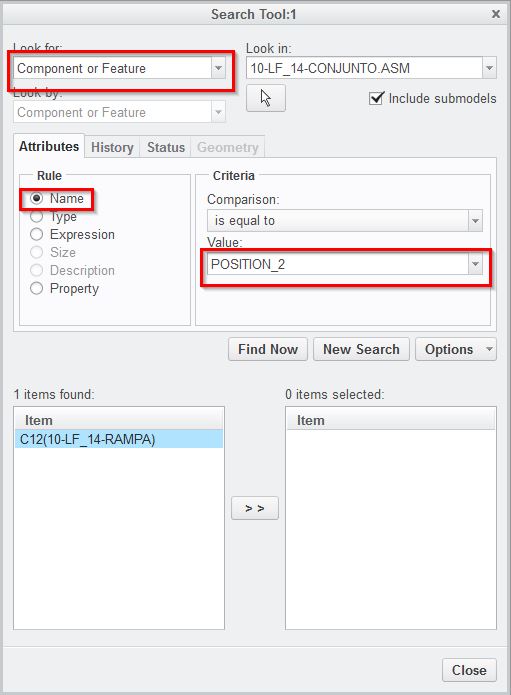
3 - Use the Find tool to locate them.

3.jpg

Hope it helps.

Jose

2 replies

Dale_Rosema
23-Emerald III
23-Emerald III
September 12, 2016

When you are asking for number, are you talking version number (i.e. part.prt.11, part.prt.12, part.prt.13, ....)? If so, Creo always loads the latest version of the part, part.prt.(highest number) unless you are trying to open a specific "old" version. Then you would have to type that in directly.

pbang1-VisitorAuthor
1-Visitor
September 14, 2016

Hi

Sorry....number is ment a MODEL NUMBER.

See below.

Search for a cad part when assembling-1.JPG

The asm asm0003.asm contains several prt.

Search for a cad part when assembling-2.JPG

The subasm 345079 is inst of the generic CPI002-001.asm that has a family table.

The prt are added to the family table.

Search for a cad part when assembling-3.JPG

460002.prt has been added to the family table in two colums as the parts have been placed in the asm on two locations (M94 and M99).

Search for a cad part when assembling-4.JPG

When replace of the sub asm from the generic family table the used parts appears in the search window.

M94, 460002 and M99, 460002 may be selected.

Search for a cad part when assembling-5.JPG


M94 and M99 are not a part og the sub asm instance used in the top assembly.


Search for a cad part when assembling-6.JPG

In this view the sub asm instance has been replaced by the generic. M94 and M99 appears in the model tree.


Search for a cad part when assembling-7.JPG

The question is how to know if M94 or M99 has to be searched for to find a sub asm instance with the right part on the right location.

When searching for one of the two 460002 you may find any sub asm instance with 460002 on the top location or the bottom location.

(Another sample is when a screw is used several times on a lot of locations for all sub asm instances).

Is it possible to change the model tree name from M94 to top_ring and M99 to bottom_ring or adding parameters to the locations.

(Ref feature names that may be changed and they appears in the family table columns).

NB ! It is no use to add a parameter to the part, then it would show the same value on both locations.

POBang

1-Visitor
September 14, 2016

The M94 and M99 are the Feature ID. These get assigned automatically and can't be changed. It's hard to tell since you can't read the numbers from the images but at first glance the reason you don't see M94 and M99 in the 1st and 5th  image is because they are images of the first row instance in your table which shows those components are not used not the second row.

12-Amethyst
September 15, 2016

Try this:

1 - Add column "Feat Name" to your modeltree;

1.jpg

2 - Add unique names to each of part placements;

2.jpg

3 - Use the Find tool to locate them.

3.jpg

Hope it helps.

Jose

pbang1-VisitorAuthor
1-Visitor
September 16, 2016

Thanks....thats what I was looking for.