

1-Visitor
June 16, 2017
Solved

Section views

  • June 16, 2017
  • 9 replies
  • 3634 views

First time poster, not sure if this is in the correct place.

I'm using ProEngineer Wildfire 2.0.

Is it possible to view a section of a solid along a datum plane?

i.e cutting a solid in half to look at geometry that you can't easily see when the solid is 'full'.

Thanks in advance,

Mourad
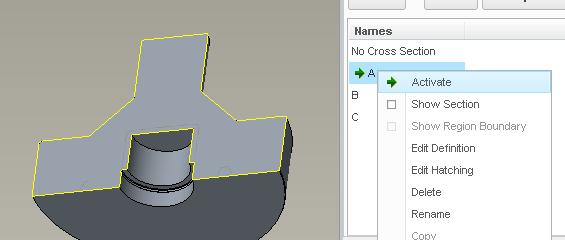
Best answer by StephenW

right mouse on the section, activate

We just discussed a similar problem How to clip parts that lie across cross section planes?

It was a graphics driver issue. Maybe you are having the same problem

9 replies

1-Visitor
June 16, 2017

I don't know for sure if this will work because I've never used Wildfire 2.0, I started on Wildfire 3.0, but I believe that if you go to View>View Manager>Xsec you should be able to create a new planar offset.

1-Visitor
June 16, 2017

And if that doesn't work... Upgrade to Creo 3 or 4...

msenouci1-VisitorAuthor
1-Visitor
June 16, 2017

Started a new job and this is what they use at the moment. They are in the process of upgrading to Creo 3.0 so all is well.

StephenW
23-Emerald III
June 16, 2017

Search the help for cross section or section. As Tyler said, the menus may have changed since Wildfire 2.

On the current software, you define cross sections in the VIEW MANAGER

msenouci1-VisitorAuthor
1-Visitor
June 16, 2017

Hi there,

I am able to create cross sections just not able to actually clip them.

StephenW
StephenW23-Emerald IIIAnswer
23-Emerald III
June 16, 2017

right mouse on the section, activate

We just discussed a similar problem How to clip parts that lie across cross section planes?

It was a graphics driver issue. Maybe you are having the same problem