

10-Marble
November 9, 2017
Solved

Shell command adding material to part model

  • November 9, 2017
  • 2 replies
  • 1646 views

The shell command in this part model is adding 5 mm to the height of the part.  Why??


(And how come this interface is so dumb that it doesn't understand attaching PTC versioned files??)

Best answer by dbasile

Try changing thickness direction. Creo looks at the existing set of surfaces, offsets another set of surfaces, and fills in the volume in between. Normally it offsets toward the inside, but it sounds like in your case it is offsetting towards the outside. You can toggle direction using the option shown below. 
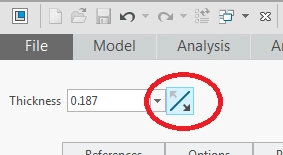
chgthkdir.png

2 replies

dbasile1-VisitorAnswer
1-Visitor
November 9, 2017

Try changing thickness direction. Creo looks at the existing set of surfaces, offsets another set of surfaces, and fills in the volume in between. Normally it offsets toward the inside, but it sounds like in your case it is offsetting towards the outside. You can toggle direction using the option shown below. 

chgthkdir.png

tfilipiak10-MarbleAuthor
10-Marble
November 9, 2017

Thank you.  Indeed this was the issue.  I had to play with the parent features to get Creo to allow me to flip the direction of the "shell" command but I did get it to work.


I have never seen such a thing as a shell command that adds material to the outside of the part and also hollows out the inside of the part.  VERY counterintuitive!