
1-Visitor
February 15, 2017
Solved

[SKETCH] Arc length

  • February 15, 2017
  • 3 replies
  • 7319 views

Hi !


I would like to change the dimension of a conic arc ? I only obtain the angle and diameter ... I would like to get the length.


Thank you


work with PTC Creo 3.0

Best answer by psobejko

You can dimension a perimeter of a circular arc in such fashion.  But for the conic one, you need to use the perimeter dimension that others mentioned:
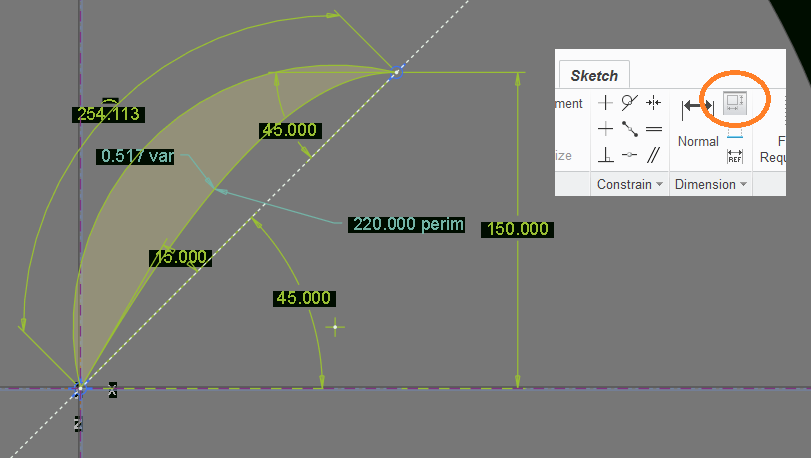
conic_arc.png

Two points I'd like to mention:

1) only one perimeter dimension per sketch is allowed (hence the grayed out icon)

2) I had to make all sketch dimensions strong (green color) prior to selecting the conic arc, clicking on the "perimeter dimension" icon and then selecting the conic factor dimension.  This dimension then has var appended to it (for "variable").  Initially it was 0.5, then it changed to 0.517 when I specified the perimeter to be 220.

3 replies

1-Visitor
February 15, 2017

Create a perimeter dimension and choose what dimension you want to make variable (driven) based off of what you set the perimeter dimension to be.

lsicsic1-VisitorAuthor
1-Visitor
February 15, 2017

Can you explain me how to use the perimeter dimension tool please ?

thank you

1-Visitor
February 15, 2017

Click on the perimeter dimension tool.  Select the entities (or entity in this case) whose total will be governed by the perimeter dimensions.  Click ok.  Then select the dimension you want to be variable (driven).  Then set the value for the perimeter dimension.

1-Visitor
February 20, 2017

When dimensioning, if you pick both ends of the arc, followed by a pick of the arc itself, you will get a dimension as shown:

2-20-2017.jpg

psobejko1-VisitorAnswer
1-Visitor
February 20, 2017

You can dimension a perimeter of a circular arc in such fashion.  But for the conic one, you need to use the perimeter dimension that others mentioned:

conic_arc.png

Two points I'd like to mention:

1) only one perimeter dimension per sketch is allowed (hence the grayed out icon)

2) I had to make all sketch dimensions strong (green color) prior to selecting the conic arc, clicking on the "perimeter dimension" icon and then selecting the conic factor dimension.  This dimension then has var appended to it (for "variable").  Initially it was 0.5, then it changed to 0.517 when I specified the perimeter to be 220.

lsicsic1-VisitorAuthor
1-Visitor
February 22, 2017

Thank you all for the help. It is a success 😃

I let here this link which help me also : Perimeter Dimension - YouTube

LÊo
