

1-Visitor
October 23, 2015
Solved

slanted cells - table

  • October 23, 2015
  • 4 replies
  • 2538 views

I am manually creating a table that is supposed to match one on a reference drawing.


Does anyone know how to create slanted/angled headers for a table? It is supposed to look like this:
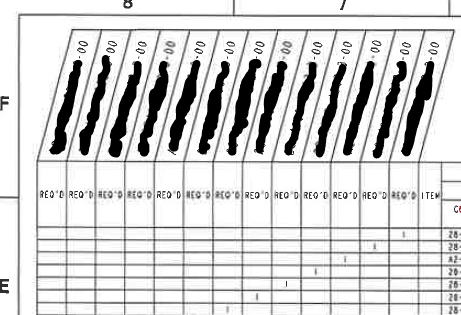


any suggestions?


This thread is inactive and closed by the PTC Community Management Team. If you would like to provide a reply and re-open this thread, please notify the moderator and reference the thread. You may also use "Start a topic" button to ask a new question. Please be sure to include what version of the PTC product you are using so another community member knowledgeable about your version may be able to assist.
Best answer by BenLoosli

It seems to me that you are trying to recreate something that while looking good, is functionally no different than the headers being vertical above each row.

Can you point to a ASME spec that specifies the header row to be slanted?

Is the drawing you are trying to copy created on a CAD system or manually on a drafting board?

Open a product idea for slanted header rows on a table and see how many votes it gets. While you are at it, open another product idea for filling in your table of which components are required for which assembly. We always had to do those tables manually.

4 replies

23-Emerald IV
October 23, 2015

Yikes!  It's definitely cheating, but maybe you could make the row height for the top row so small you can't see it (the text will still extend up okay), put a slant angle on the text, and then draw the outline of the angled cells with either sketcher or a custom symbol.

BenLoosli23-Emerald IIIAnswer
23-Emerald III
October 23, 2015

It seems to me that you are trying to recreate something that while looking good, is functionally no different than the headers being vertical above each row.

Can you point to a ASME spec that specifies the header row to be slanted?

Is the drawing you are trying to copy created on a CAD system or manually on a drafting board?

Open a product idea for slanted header rows on a table and see how many votes it gets. While you are at it, open another product idea for filling in your table of which components are required for which assembly. We always had to do those tables manually.

mslotty1-VisitorAuthor
1-Visitor
October 23, 2015

This was a CAD drawing, though I'm not sure which interface/program was used to create this.

Creating tables like this is per request from a large customer we have - not sure if there even is an ASME spec regarding slanted cells.

For the time being, I am just creating the table with vertical headers.

Sketching in the angled cells seems like it would be more trouble than it's worth in the future iterations of the drawing.

An auto-fill table template would be SO NICE for creating drawings or assemblies that have 7, 8, or 9 iterations of a single assembly.

This is what we're filling in and creating, by hand.

12-Amethyst
October 23, 2015

create an image of it and paste it on the drawing