

1-Visitor
April 7, 2015
Solved

Surface will not thicken - please help!

  • April 7, 2015
  • 2 replies
  • 7696 views

Hi all,

I'm having great trouble trying to thicken what seems like a very simple, smooth surface, with no undercuts in Parametric 2.0. I've tried the various different fits (controlled and automatic) with no success. If anyone could give me any guidance I'd be extremely grateful.

Please see attached files.

Thanks,

Sam
Best answer by MartinHanak

Samuel,

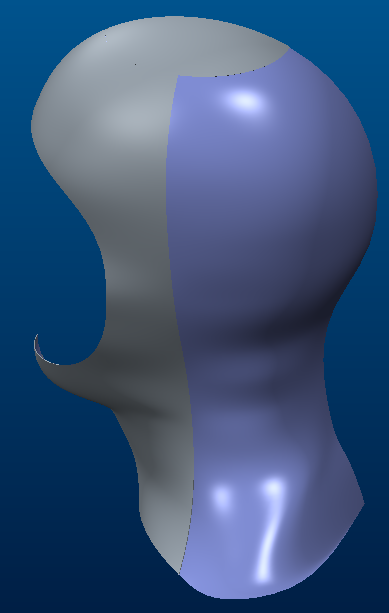
I suppressed Mirror and Merge features. Then I was able to thicken 2 of 3 patches, see grey areas on my picture. Third patch cannot be thickened, because surfaces are self intersecting. Apply Curvature analysis and you will see strange results at the bottom of the quilt (shoulder). Maybe if you cut shoulder off, then the problem disappears.

head.png

"How to thicken one patch":

  • set selection filter to Quilt
  • select quilt
  • CTRL+c
  • CTRL+v
  • in dashboard click Reeferences > Details > Excluded Surfaces
  • press CTRL and select unwanted surfaces
  • finish Copy feature
  • select surface and apply Thicken feature (0.5)

Martin Hanak

2 replies

16-Pearl
April 7, 2015

Hi Samuel,

sadly I cant open education version of file. So my guess is that mirroring that surface creates problem in zone where mirrored surface connects with original.

Try thickening before mirror.

Cheers

1-Visitor
April 7, 2015

Hi Davor,

Oh I see, my apologies. Still no luck thickening before the mirror sadly!

1-Visitor
April 7, 2015

I would look to increase the part accuracy, changing it to absolute if it isn't already, and to use a small thickness value to start.

24-Ruby III
April 8, 2015

Samuel,

I suppressed Mirror and Merge features. Then I was able to thicken 2 of 3 patches, see grey areas on my picture. Third patch cannot be thickened, because surfaces are self intersecting. Apply Curvature analysis and you will see strange results at the bottom of the quilt (shoulder). Maybe if you cut shoulder off, then the problem disappears.

head.png

"How to thicken one patch":

  • set selection filter to Quilt
  • select quilt
  • CTRL+c
  • CTRL+v
  • in dashboard click Reeferences > Details > Excluded Surfaces
  • press CTRL and select unwanted surfaces
  • finish Copy feature
  • select surface and apply Thicken feature (0.5)

Martin Hanak

24-Ruby III
April 8, 2015

Samuel,

cut 5 mm from the bottom of the quilt and you will get, what you need.

head2.png

Martin Hanak

1-Visitor
April 8, 2015

Thank you, Martin!!