10-Marble
December 18, 2025
Solved

Surfacing Newbie - Create a surface from sketches contained within an outline curve

  • December 18, 2025
  • 4 replies
  • 590 views

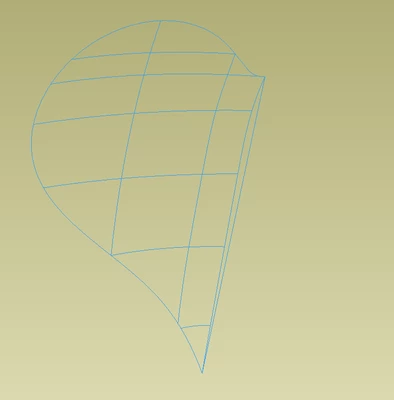
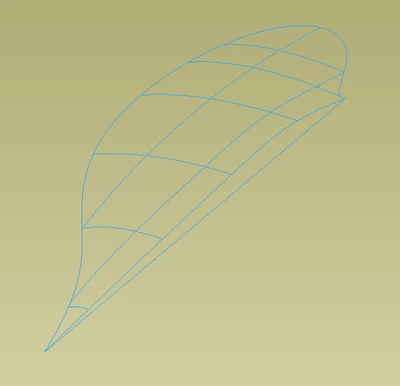
I'm very new at compound surfaces. I'm using Creo 9 and I'm trying to create a surface from a sequence of curves shown in the first few pictures.


In the past I've been successful with using boundary blend to get a basic surface that I need.  However this case is more complicated than normal in that not only do I have 2 directions of curves I also have an outline it needs to extrapolate to.
 

Airfix_0-1766039708489.png


Airfix_1-1766039725175.png


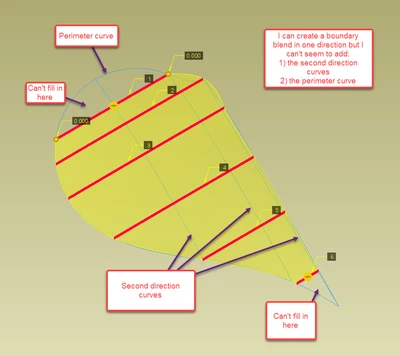
The next picture is a successful boundary blend in one direction (it fails when I try to add in the secondary direction curves) but as you can see it spills out over the perimeter in some locations and doesn't fill in the perimeter in others.  To be honest I'm not really sure how to add in the perimeter curve as a constraint.
 

Airfix_2-1766040081739.png

This next picture is the closest I've gotten to a fully filled in outline by selecting the curves in the other direction from the picture above and adding in a selection of the perimeter.  The result as you can see is not desirable as the surfaces have several folds in the them.  I know boundary blend is sensitive to the start point and end point sequence of each selected curve which I suspect is my problem here.
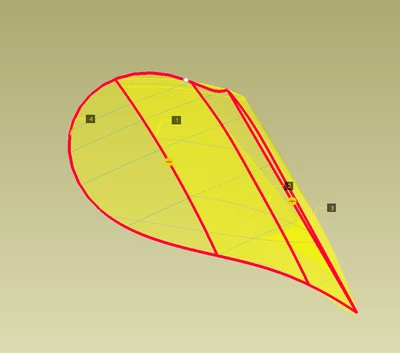
 

Airfix_3-1766040424920.png


What I'm really looking for is just some tips on the sequence of tools I need to use and any things to watch out for in order to achieve a nicely blended continuous surface.  Am I heading down the right track with boundary blend or am I way off base?


Edit:

Note I've viewed this video and still can't get things to work out how I want.

https://www.youtube.com/watch?v=12CYdjy3LUk


Cheers,


Airfix.

Best answer by kdirth

After interrogating your model I found that SKETCH-X-SLICE-4 has overlapping segments.  The center section and the near line are doubled up.  deleting one of each fixed the selecting issue.

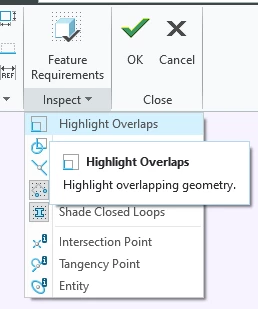
The doubled constraints are a clear giveaway of the overlapping curves.  You can also use Highlight Overlaps in the Inspect overflow.

kdirth_0-1766172506485.png

kdirth_1-1766172619362.png


4 replies

22-Sapphire II
December 18, 2025

In general, when using boundary blend, you want to have a 4 sided geometry to build the surface. Overbuild your surfaces and then trim them to get the required shape at the outer boundary. The boundaries do not need to be straight lines. The image below illustrates the general problem where you would build a 4 sided surface and then trim it to get the desired shape at the edges. Using internal curves will give control over the topology within the boundaries.


tbraxton_0-1766075783143.png


Airfix10-MarbleAuthor
10-Marble
December 18, 2025

tbraxton,


That's a good tip about over build and trim, I should have thought about that.  A few follow up questions:


1) Does it matter if the internal curves are Sketches or Datum Curves?  Sketches seemed easier for me to create where as Dave Martin used datum curves in his video. which might have an advantage I don't know about.  I originally had my sketches closed loop but found I couldn't generate a surface with a closed loop and I couldn't seem to select just the portion of the sketch I wanted.


2)  Is there a fundamental reason why I can only seem to generate the surface using 1 direction rather than using both directions (X and Y) as I've tried in my first post?  There are 3 perpendicular planes that you can use to generate the internal curves to create a compound surface.  I tried to use the X and Y planes as shown in my first post because the profiles seemed to be easier to create however I might try and create the sketches on the Z plane which would require me to offset the outline which might produce better results but more difficult to create the curve.


This is a learning exercise for me and I thought this would be a simple way to learn more complex surfaces and the thought was to eventually 3D print it.  However I might have bitten off more than I can chew.  Maybe I'll work with a more simple perimeter first to learn the tools.


3) Are there any other tutorial videos you recommend?  I love the Dave Martin stuff on YouTube.


Cheers,


Airfix

kdirth
21-Topaz I
21-Topaz I
December 18, 2025

1) Both types should work fine.  The datum curve allows for a 3D curve instead of 2D.  When selecting a sketch line, default is to pick the entire chain; use RMB to select a single segment and shift to add to it.  Which brings up another point, using chains creates multiple surfaces in the quilt.


@2) I don't know how you are trying to select the 2nd direction curves.  More info and screen shots would help in understanding.  First, use second direction selection box. Second, the second direction curves must intersect with the first direction curves.

There is always more to learn.
Airfix10-MarbleAuthor
10-Marble
December 18, 2025

Okay so I have simplified the model and made the model tree a little cleaner for general viewing (my first model was a throw a way model to try the technique) and I'm still having trouble but I don't know why.  I've attached the .prt file to this message but I'll explain with some screenshots.


Model setup:

I created an outside perimeter and an inside perimeter taking note of creating the surface bigger than you need then trim philosophy and also having a 4 sided outside shape.

I created a series of slicing planes planes along the x axis and Y axis.

On each of those X planes I created a sketch using the arc command for the curved portion of the sketch.

At each Y slicing plane I created datum points to use as references for Y sketches.

I created the Y sketch curve portions using splines so I could directly intersect with the points created in the previous step.

Then unsuccessfully tried the boundary blend and trim method.


In my model you will see the 3 different attempts I had at creating the boundary blends.  The extrude and trim only works with boundary blend 3.


Airfix_0-1766096903203.png

Airfix_2-1766096970812.png


In blend 1 I could only pick the first 4 curves in the X direction and but I could pick all Y curves in the Y direction. I don't know why I couldn't select all of the X direction curves.

Airfix_3-1766097114690.png


Blend 2 I tried from the other side of the X curves.  it wouldn't let me select SKETCH-X-SLICE-4 for some reason.

Airfix_4-1766097372428.png

In Blend 3 it wouldn't let me select SKETCH-X-SLICE-4 either.

Airfix_5-1766097472028.png


Finally when I did my trim on boundary blend 3 I can see that the circular perimeter isn't planar.  How do I make it so the circular perimeter is planar?


Airfix_6-1766097655130.png


Also because I was mostly winging the dimensions and using splines for the Y direction curves it's not a very smooth surface but it was a quick way for me to try out the tools and hopefully get some feedback.


Help appreciated.


Airfix


kdirth
21-Topaz I
21-Topaz I
December 19, 2025

No part file attached.  Put it in a zip folder and attach the zip folder.


I suggest verifying that SKETCH-X-SLICE-4 intersects with all of the Y curves.


Because the surface is not created using the planer boundary curve, the trimmed edge will not be planer.

There is always more to learn.
Airfix10-MarbleAuthor
10-Marble
December 19, 2025

kdirt,


I've double checked the intersection of slice 4 curve with the Y curves and it looks good to me.  The Y curve was generated using datum points on the slice 4 curve and it looks to me everything is lined up.


I tried to use the perimeter circle to create the curve but I couldn't make it work.  I think I probably need to divide the circle in the sketcher mode so that the division line up with my X and Y planes and then maybe I'll be able to pick it during the blend.  I'll give that a shot.


Attached is the zip file.


Steve

22-Sapphire II
December 19, 2025

Take a look at this old thread. Some useful options for how to deal with similar surfacing issues.

https://community.ptc.com/t5/3D-Part-Assembly-Design/Another-workaround-for-3-side-surface/m-p/149815 

Airfix10-MarbleAuthor
10-Marble
December 20, 2025

tbraxton,


I'm a little in shock and astonished that I finally managed it in about a third of the features I was originally trying. Perseverance is really important with Creo - oh and some good guidance from the experts.  I have one more issue regarding tangency of surfaces that I need to resolve but it's pretty good.


The key was splitting the shape into 4 portions and stitching the resultant surfaces together.  Downloading your model really helped my realize the complexity of my first model thus making the surface generation much harder - I still think it should not have failed - thanks for finding those overlapping segments (insert *embarrassed emoji* here).


It took me a bit of time to figure out when doing the boundary blend after right clicking to select part of a curve you can then hold shift to add additional segments of the same curve.  I also noticed that it was really finnicky about the order of the mirror. If I merged the left side before I mirrored then the mirror operation would fail.  If I mirrored the surfaces individually and then merged them one at a time I got success.  Maybe more by luck than skill.  Maybe I'll go back and try to reduce the number of merges.


Here is what I did, model attached.

Airfix_0-1766194524961.png

I took my original curve and added a plane so I could create the boundary blend in 2 parts rather than trying to do it all in one feature. That was key.


The curves used for the blend, 2 of the 3 highlighted.

Airfix_1-1766195684142.png

B. Blend 1

Airfix_2-1766195737926.png


B.Blend 2


Airfix_3-1766195794449.png

Then it was just a sequence  of mirror and merge operations to get the full solid.


Airfix_4-1766195937886.png

I'd like to figure out the tangency of this piece:

Airfix_5-1766196347494.png

I tried to modify the tangency in the boundary blend control dialogue box but the features fails:


Airfix_6-1766196440247.png


I could just add a round but it would be nice to have the tangency correct.


Next project will be to try and flatten the quilt, add some surface features and then wrap back on the surface but that's a learning experiment for another day.


Cheers,


Airfix


5-Regular Member
December 20, 2025

Bart Brejcha and I did some intoductory surfacing videos a  while back you see them on the Design Engine you tube channel. What you have shown is a four side patch that is trimmed back. Add some internal cuves in each direction to contol the  contouring. Boundary Blend or style will work fine.  Overbuild to a theorectical location to contol the pinching. Gettign the curves to "relax" always takes prctice, but use the comb plot (curvature anaylsis) to evaluate in real time.