

1-Visitor
August 29, 2016
Solved

Template Directory
  • August 29, 2016
  • 6 replies
  • 9003 views

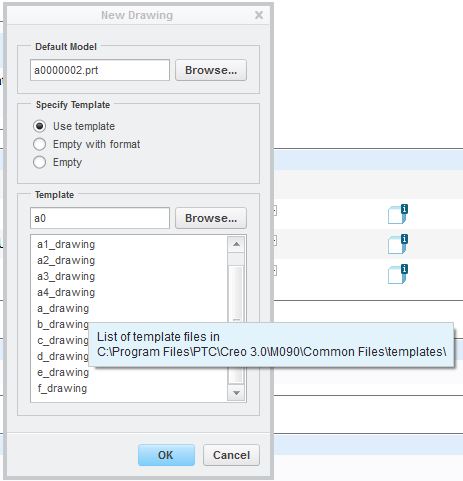
Capture.JPGHow do you change the directory that list your drawing templates?

I do not have permission to save to the default location.


This thread is inactive and closed by the PTC Community Management Team. If you would like to provide a reply and re-open this thread, please notify the moderator and reference the thread. You may also use "Start a topic" button to ask a new question. Please be sure to include what version of the PTC product you are using so another community member knowledgeable about your version may be able to assist.
Best answer by MartinHanak

Hi,

set config.pro option start_model_dir


MH

6 replies

23-Emerald III
August 29, 2016

pro_format_dir set in config.pro set to your local folder that has the templates in it.

pro_format_dir c:\ptc_user\user1\formats

bjoyner1-VisitorAuthor
1-Visitor
August 30, 2016

Ben

      Thank you for the response.   I did try that, but it seems to keep pointing to

the location shown in the original screen capture.

I did however get my permissions changed so that I can save to that location.

23-Emerald III
August 30, 2016

The system will still point to the system template folder for drawings. Maybe this needs to be an enhancement request.☺

If you select Brose, it will open your defined folder for the templates.

I would NOT recommend modifying or saving the drawing templates back to the system folder as they get overwritten/deleted when you upgrade!

24-Ruby III
August 31, 2016

Hi,

set config.pro option start_model_dir


MH

bjoyner1-VisitorAuthor
1-Visitor
August 31, 2016

Thank you.  That seems to have resolved my problem.

The description of the option is a little confusing though.

Not sure what other things it affects but it does point my template list to the desired location.

Thanks again !

Brian