

1-Visitor
February 23, 2016
Solved

Titles on Creo 3.0 Simulate Results Windows

  • February 23, 2016
  • 1 reply
  • 2483 views

Does anyone know if there is a way of making the title of a results window visible in Creo 3.0 Simulate (M020)? This was possible easily in Creo Simulate 2.0 and now it does not do it. Is this a bug or is there an option I am not ticking?

Many thanks.


This thread is inactive and closed by the PTC Community Management Team. If you would like to provide a reply and re-open this thread, please notify the moderator and reference the thread. You may also use "Start a topic" button to ask a new question. Please be sure to include what version of the PTC product you are using so another community member knowledgeable about your version may be able to assist.
Best answer by 346gnu

Colin,

The short answer is ... no.

In Creo 3, the title is only where I have indicated.

Your options are limited to

1. Annotating in the software

2. Grabbing the window and annotating using the drawing tools in Excel, Paint.net, Paintshop ...

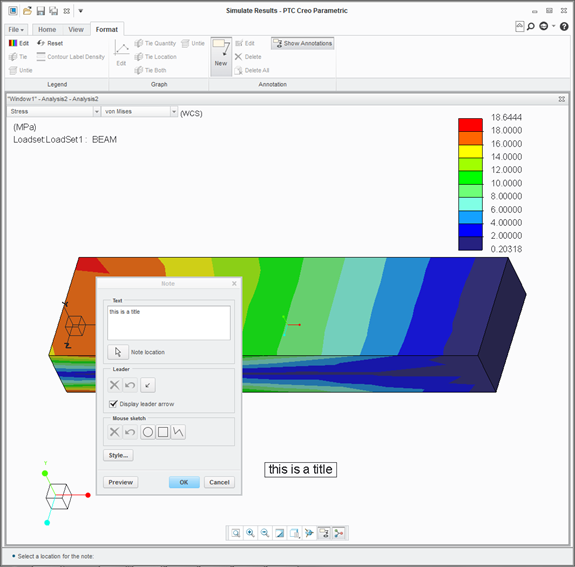
The image below is using the annotations in the software

However, I am not satisfied with the control one has over the print function from within the s/w and life is much higher resolution using 3rd party grabbing and sizing tools methods.

Regards

1 reply

13-Aquamarine
February 23, 2016

Colin,

Does this help?

Titles are no longer along the bottom of the window

Regards

cbarron1-VisitorAuthor
1-Visitor
February 23, 2016

Charles

Thank you very much for your response.

What I would like is for the title to be in the window so that when I "print" a plot it has the title in it, see Creo 2 example attached. Is there any way to achieve this in Creo 3.0?mast_impact_2.jpg

346gnu13-AquamarineAnswer
13-Aquamarine
February 23, 2016

Colin,

The short answer is ... no.

In Creo 3, the title is only where I have indicated.

Your options are limited to

1. Annotating in the software

2. Grabbing the window and annotating using the drawing tools in Excel, Paint.net, Paintshop ...

The image below is using the annotations in the software

However, I am not satisfied with the control one has over the print function from within the s/w and life is much higher resolution using 3rd party grabbing and sizing tools methods.

Regards