12-Amethyst
January 4, 2024
Solved

Trouble with features flipping when using a UDF

  • January 4, 2024
  • 1 reply
  • 4148 views

I am creating a UDF of the J1926-1 feature on the end of solid round bar.

When I run the UDF on other locations, the revolves and extrudes 'flip' and do not follow the way they were created.  Using the hole command, I have been able to create the spotface, drill depth, etc without any issues.  When I run the UDF, the helical sweep cut (thread) of the feature flips. I have created other UDFs of this same feature and all appear to work correctly.  Any ideas of what I am doing wrong?

Best answer by tbraxton

All of your models appear to be using legacy start parts that have accuracy set to relative and not absolute. I strongly advise you to correct this ASAP. If you are working in Creo 7 or newer this is mandatory according to PTC. If you do not do this, you are in for a world of pain going forward.


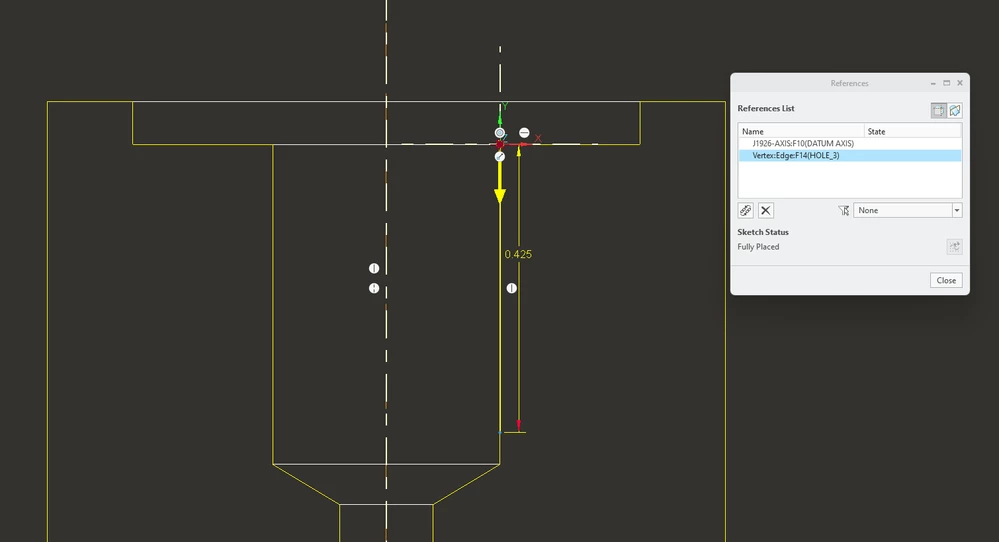
Creo 9 models enclosed for reference. This implementation of the UDF works on your test model. I changed the references of the helical sweep profile section. You will need to verify the dims of this feature. I have no rigorous proof of the issue in your models but as I suspected it seems to be related to the references used in the helical sweep. I changed the references of this sketch and added a csys to the sketch.


In general, always minimize the references used for any feature to be included in a UDF. This is a shot of the profile sketch in the helical sweep. Change your UDF definition to match this and it should work.

tbraxton_0-1704383701417.png


1 reply

tbraxton
22-Sapphire II
22-Sapphire II
January 4, 2024

Are you certain that the UDF contains a complete definition of the reference frame? If you can use a CSYS in the UDF definition that is usually quite robust. If you are using a reference that is not within the UDF that could be the issue. It is hard to tell without seeing how the UDF and target model are defined.

B_Baker12-AmethystAuthor
12-Amethyst
January 4, 2024

All of the References are tied to only features created in other features in the UDF.  It is tied to a centerline and the surface of a hole feature.  There are no references to features created outside of the UDF.  Is this what you are asking?

tbraxton
22-Sapphire II
22-Sapphire II
January 4, 2024

Yes, that is what I was asking in the context of the references used by the helical sweep. Are you able to flip the direction when placing the UDF and if so, does it regenerate correctly?