15-Moonstone
April 9, 2019
Solved

Twist a branch bundle in flatten harness

  • April 9, 2019
  • 1 reply
  • 1804 views

Anyone know how to do this. Can't get this to work for the life of me. Here's the 3D routing:
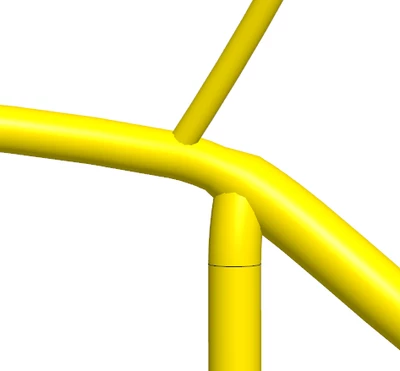
 

Cabling000339.png


And here's theflattened harness:

Cabling000338.png


All my branch bundles are branched in the same direction (to the right). How can I switch this? I want to rotate one of these branch bundles so they're pointing in opposite directions.

Best answer by Pettersson

Figured it out, sort of. I can add a bend, twist it, then set back the bend angle to zero. Unfortunately, I can't add a bend inbetween these two branch bundles, since there's no segment break between them. So I'd have to figure out a way to add a location inbetween them, which is tricky since it's all on a network.

1 reply

Pettersson15-MoonstoneAuthorAnswer
15-Moonstone
April 9, 2019

Figured it out, sort of. I can add a bend, twist it, then set back the bend angle to zero. Unfortunately, I can't add a bend inbetween these two branch bundles, since there's no segment break between them. So I'd have to figure out a way to add a location inbetween them, which is tricky since it's all on a network.