1-Visitor
May 27, 2017
Solved

Two arrow with difference style in one dimension line

  • May 27, 2017
  • 2 replies
  • 6618 views

Hi,

I am look forward to express a dimension line with two difference arrow type styles. Just like below photo, one end is standrd arrow and other end is dot, it is possible in Creo 2.0?

All my try show only one type style, boh standdrd arrow, or both dot, it is impossible to mix arrow and dot. thank you in ahead and have a nice weekend.
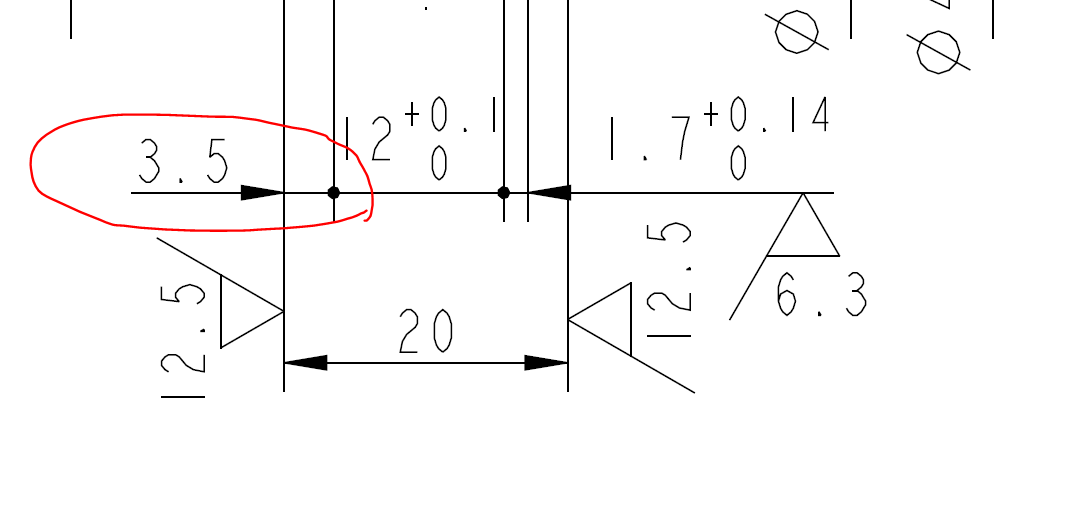
Dimension line with differerne ends style.PNG

Best reagrds, Hongjie

Best answer by StephenW

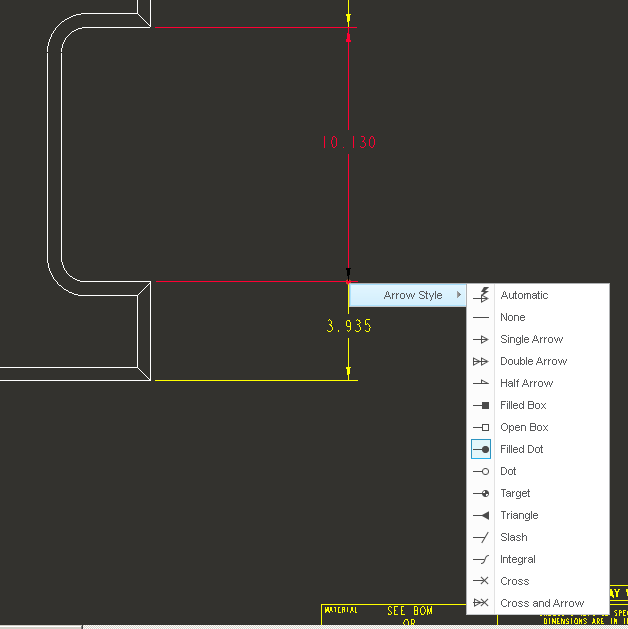
In Creo 3, if you select the dimension and then hover the mouse over the arrow, right click, you can change the arrow on one side only.

I don't remember if it works like that in Creo 2, you'll have to try it.

2 replies

StephenW23-Emerald IIIAnswer
23-Emerald III
May 27, 2017

In Creo 3, if you select the dimension and then hover the mouse over the arrow, right click, you can change the arrow on one side only.

I don't remember if it works like that in Creo 2, you'll have to try it.

2-Explorer
May 29, 2017

Creo 2.0 M200 is the same method.

Only pop-up menu looks a little bit different...

Milan Bonka

Hongjie1-VisitorAuthor
1-Visitor
June 5, 2017

Hi Milan

it work in my Creo 2.0, M240, thank you.

Hongjie1-VisitorAuthor
1-Visitor
June 5, 2017

Hi Stephen,

pre choice the dimension and hove to find the arrow disappear( need a little patinet)  then right clik to show arrow style promt.

thank you veru much!

Best reagrds, Hongjie