

1-Visitor
August 8, 2016
Solved

Unable to exit PTC Creo Parametric.

  • August 8, 2016
  • 3 replies
  • 3644 views

When I'm tring to exchange Current Workspace or Exit the Application, then CREO is showing this messagebox.
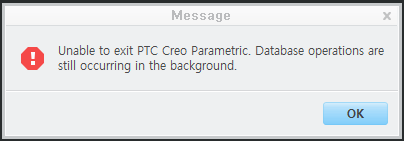
 

Cap 2016-08-08 11-38-20-152.png


I couldn't found any answer.


What's this Troubleshooting?


How can I fix it?


Please help, Thanks.


This thread is inactive and closed by the PTC Community Management Team. If you would like to provide a reply and re-open this thread, please notify the moderator and reference the thread. You may also use "Start a topic" button to ask a new question. Please be sure to include what version of the PTC product you are using so another community member knowledgeable about your version may be able to assist.
Best answer by BenLoosli

It means the transfer of data from Creo to your PDM is not complete.

Usually occurs with a large assembly that you are saving with automatic upload or checking in.

3 replies

BenLoosli23-Emerald IIIAnswer
23-Emerald III
August 8, 2016

It means the transfer of data from Creo to your PDM is not complete.

Usually occurs with a large assembly that you are saving with automatic upload or checking in.

배상현1-VisitorAuthor
1-Visitor
August 8, 2016

Yes, Thank you ^^

When I finished wrote the this question, CREO was wokring.

I have just waiting. It's all.

(That was a large assembly, yes.)

1-Visitor
October 14, 2016

In my case it's not a large assembly.

I simply loaded my .asm without any other PDM operation

and after many minutes CREO2 is still locked !

Pier