1-Visitor
March 28, 2019
Solved

Uniform cross-section twist feature

  • March 28, 2019
  • 1 reply
  • 5351 views

Hi,


I'm trying to create a spiral/twist feature with uniform cross-section.

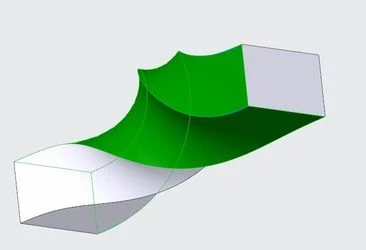
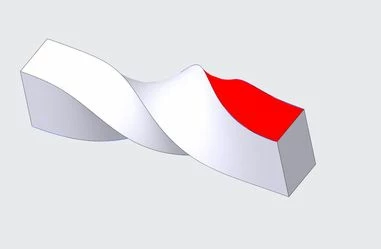
See below image created using Warp (twist) feature by twisting the rectangle by 180 degrees across the extruded length. The problem here is I need the four surfaces to be flat rather than a curved one.

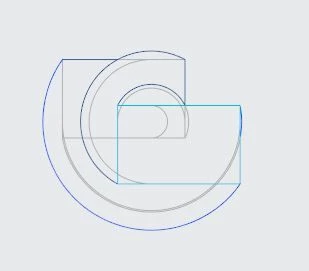
I've tried using sweep feature but to no success. Also, note that the rectangular cross-sections are to be offset in two directions i.e. they don't share the same centreline (see final image).

Any help on this is highly appreciated. Thanks!
warp1.JPGwarp2.JPG

warp3.JPG

Best answer by cfc44

yeah looks like it. I was able to simulate it a bit better with SolidWorks. But, the profile created within Creo seems to be working for my purposes. Thanks for the guidance

1 reply

16-Pearl
March 28, 2019

I modeled this with sweep and the twisting angle is controlled by a graph:


twist.jpg


I attached here the creo 4 file for your reference. Hope it helps

cfc441-VisitorAuthor
1-Visitor
March 28, 2019

Thanks for the reply.

What I was aiming for was a straight line rather than a curve as shown by the red line below.

So, instead of having that c-shaped arc, I am after a line like the red one.

The reason for that is, I want the width (and length) of the rectangle to be the same throughout.

That is, if I were to pass a rectangle through the hollow surface, is should go through.

Right now, it will bulge out as the surface is c-shaped. Hope this makes sense. Cheers!

twsit_mod1.JPG

16-Pearl
March 28, 2019

The section is actually uniform/constant for that sweep feature but the surface would look flat from other angles. To have so called the "flat" surface, the sweep section needs to be circular as demonstrated below:

flat_twist.jpg

The surface and both ends need to be patched to keep that rectangular shape. See the attached creo 4 file. Is this what you wanted to do?