

1-Visitor
May 1, 2014
Solved

Very painful switching from SolidWorks to Pro/E

  • May 1, 2014
  • 28 replies
  • 14614 views

I recently switched from SW to Pro/E WF5, it is very painful. A lot of convenient things seem not available in Pro/E.

1. In SW, I can pick anywhere in an assembly, say an edge of a part, the part will be highlighed in the model tree on the left. In WF5, no way, it is difficult to do this backward matching, you can only pick in the model tree and see it highlighted in 3D model.

2. In SW, you can right click on a part or multiple parts/sub-assembly in an assembly, and choose "Isolate", it will isolate these parts and hide the rest. In WF5, no easy way to do this, you have to select the rest and hide.

3. In SW, you can right click on a part or multiple parts/sub-assembly in an assembly, and make these parts semi-transparent, very useful in observing a big assembly. I don't know how to do this in PTC, probably a lot of clicks needed.

4. In SW, when measure some dimensions, it is easily to switch the measuring units, no matter what is the part unit set up for, and it can show two units at a time i.e.(mm&in), in WF5, it only sohws one unit. I don't know how to show two or switch show in other unit for measuring.


This thread is inactive and closed by the PTC Community Management Team. If you would like to provide a reply and re-open this thread, please notify the moderator and reference the thread. You may also use "Start a topic" button to ask a new question. Please be sure to include what version of the PTC product you are using so another community member knowledgeable about your version may be able to assist.
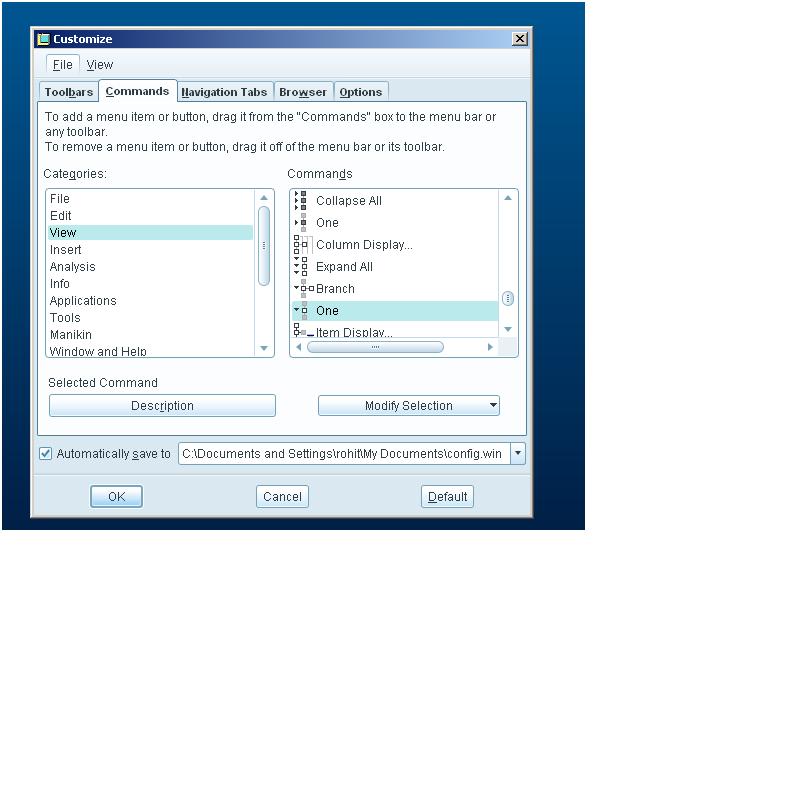
Best answer by rohit_rajan

there is one more option which would highlight the part no matter where it is deep inside ...

go to Tools> Customize Screen>View>One..select it and drag it to the toolbars somewhere..then select a part in the graphics window...and click on it..it will highlight in the model tree.

They are different Softwares...Michael..they will have there differences!

one.JPG

28 replies

15-Moonstone
May 2, 2014

2. in proe wf5 press Ctrl and select the parts you want to isolate then RMB and select Representation and select "Master"..it will isolate your parts exactly as in solidworks.

if you want to have your main assembly back look for "View manager" , in View manager under Simp Rep there would be "+" infront of master rep just doulble click on it, you will have your main assembly back.

and if you want to save the particular "isolation" just right click over the "+" sign and RMB save.

1. in wf5 also if you pick on the graphics windows it will surely highlight in the model tree and vice-versa.

3. to make parts semi transparent select "view manager ", select style, in bottom left you will see properties, select it then on the top you will see the option for transparency.

once you select the part the 3rd option is for transparency.


4. the changing of units while measuring i think is not there in wf5, but creo 2.0 has it now.


1-Visitor
May 2, 2014

Thanks for replying.

For 1, it seems only parts in the top level assembly works this way, if a part in a sub-assembly, nothing will happen, but in SW, no matter how deep a part is buried, it will be found in model tree, and highlighted, which is very convenient.

For 2,3, I will try tomorrow. Seems a lot more clicks than SW.

15-Moonstone
May 2, 2014

there is one more option which would highlight the part no matter where it is deep inside ...

go to Tools> Customize Screen>View>One..select it and drag it to the toolbars somewhere..then select a part in the graphics window...and click on it..it will highlight in the model tree.

They are different Softwares...Michael..they will have there differences!

one.JPG

1-Visitor
May 2, 2014

Mechanisms in sub assemblies are retained in PROE but not in solid works, check that. it will be treated as rigid in solid works

1-Visitor
May 6, 2014

the right answer is to every 3d software has own exclusively advantages over other software,you mustn't find a better job which is with respect to Mechanical Desing or product stucture design if you can't be familiar with the PROE/CREO in ShenZhen City in China

1-Visitor
May 18, 2014

While not an option for Wildfire, apparently in Creo this has been improved:

from usecreo dot com/ten-new-capabilities-of-creo-parametric.html

8)Selecting Sketcher Reference “On The Fly”

Have you ever started sketching a profile and then realized you would like to snap the sketch to some underlying geometry? You can now add these references “on the fly” by holding the [CTRL] and [ALT] keys and selecting the edge, plane, vertex, etc.

StephenW
23-Emerald III
May 19, 2014

I just tried this tip...works like a charm in Creo 2. Now just to remember to use it as I am working. Not at all intuitive to hold CTRL+ALT but it does make adding the references easy.

1-Visitor
May 18, 2014

The bottomline: nothing great comes easy.

2-Explorer
November 24, 2015

Great Thread... Thanks... Learned some good tricks!