

1-Visitor
April 5, 2017
Solved

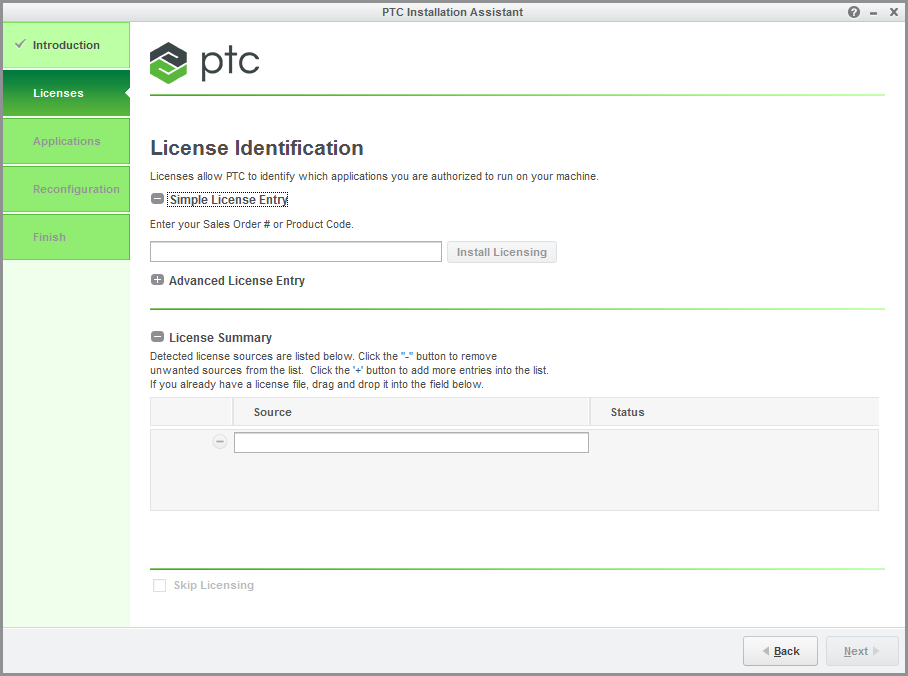
Where is my plus button in the License Identification window?

  • April 5, 2017
  • 1 reply
  • 1100 views

There is supposed to be a plus button in the License Summary field of the License Identification window (second step when running reconfigure.exe, see also figure below). I don't see it, but I am instructed to add a specific source there, which I can't. It sounds trivial, but where can I find it?reconfigure.png
Best answer by MartinHanak

Hi,

you do not need PLUS button. You can enter path to license source manually.

Option no.1 (floating license) ... type 7788@license_server_name

Option no.2 (locked license) ... type full_path_to_license_file

MH

1 reply

24-Ruby III
April 5, 2017

Hi,

you do not need PLUS button. You can enter path to license source manually.

Option no.1 (floating license) ... type 7788@license_server_name

Option no.2 (locked license) ... type full_path_to_license_file

MH