

1-Visitor
March 29, 2017
Solved

Wrap direction ???

  • March 29, 2017
  • 1 reply
  • 2115 views

Ok, this is probably pretty basic, but a user stumped me today with a part which he needs to modify by changing a wrapped sketch such that it is wrapped in the clockwise direction around a cylinder.  He asked why is the "reverse wrap direction" button grayed out.  Creo seems to only want to wrap in the anti-clockwise direction:
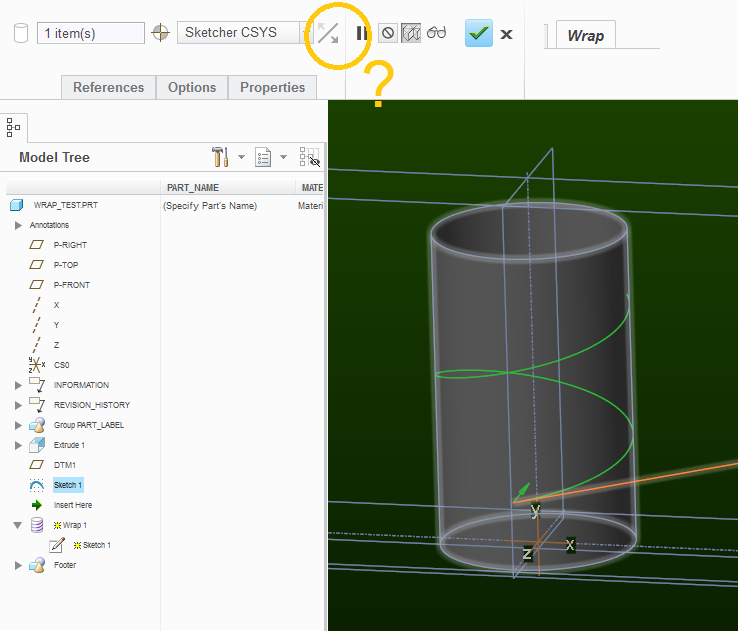
wrap_question.png

  What am I missing?

Best answer by kdirth

That only works when the sketch could be projected either forward or backward onto the surface.  In your case, changing the sketch to run the other direction is your only option.

If the sketch was on a plane thru the middle of the part, you would be able to change it, but it would also start on the opposite side of the cylinder.

1 reply

kdirth
kdirth21-Topaz IAnswer
21-Topaz I
March 29, 2017

That only works when the sketch could be projected either forward or backward onto the surface.  In your case, changing the sketch to run the other direction is your only option.

If the sketch was on a plane thru the middle of the part, you would be able to change it, but it would also start on the opposite side of the cylinder.

There is always more to learn.