
15-Moonstone
October 27, 2022
Question

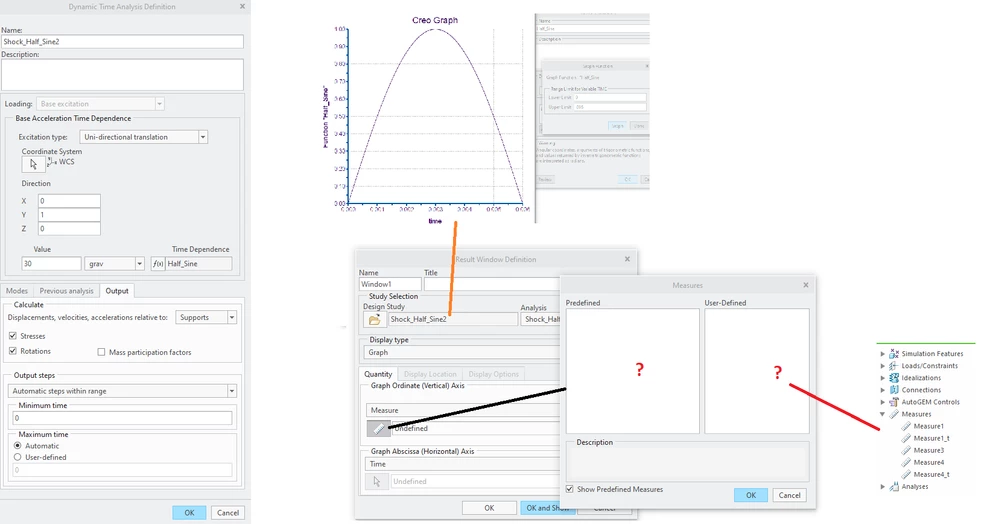
Why are there no results can be plotted in half-sine 30g impact shock analysis!?

  • October 27, 2022
  • 1 reply
  • 2943 views

I have finished a half-sine 30g impact shock analysis, however, I can't plot any results even I have defined some "measures". What could be wrong?!
JS_9824412_0-1666883130828.png

 What could be wrong in setup?

Thanks.

P.S.

(BTW, I also ran the same half-sine 30g impact shock analysis using SolidWorks Simulation concurrently, which produced stress results that I wanted within 1 minute using a laptop Precision 7550_2.5GHz-32GB, in contrast, CREO took 12 minutes using a desktop Precision 5820_3GHz-128GB).

1 reply

Chris3
21-Topaz I
October 27, 2022

I am not going to be able to answer your question, but unless you are sure that there are the same number of time steps for each analysis I don't think its fair to compare times head to head. Also you may have slightly different geometry in both solvers (one is likely a conversation of the other).


What measures did you define and did you confirm that they are valid for the analysis you are trying to do?


I have compared solvers head to head before and for medium to complex geometry you are never going to get exactly the same answer. This is part of the reason that factors of safety are used.

15-Moonstone
October 27, 2022

You are right, the comparison on time usage is not fair, except that it is easier to get results and plot results in SolidWorks Simulation because there are far less buttons to click in SW so there is less chances to trip off. (And this is the first time I try to learn SolidWorks Simulation to run half-sine impact shock analysis! It took far longer time to define correctly the half-sine curve in CREO than in SW for a first time user). I defined one measure as follows:

JS_9824412_0-1666887649225.png

There might be somewhere wrong in the definition. Thanks for your time.

Chris3
21-Topaz I
October 27, 2022

Did your modal analysis run successfully?


If you haven't already I would suggest you watch Lino's video at the link below. At the 48 minute mark he goes over what looks like a very similar problem.


https://community.ptc.com/t5/Creo-Parametric-Tips/Creo-Simulate-Advanced/ta-p/821215#M1043